Search This Blog

Showing posts with label games. Show all posts

Wednesday, August 04, 2010

NWScript Stack System

Note: SW has written a new post, talking about NWScript in general, akin to my post yesterday (though possibly in more detail than mine; I haven't actually read it all yet).

So, now we know where we are (the NWScript system), and where we need to go (LLVM assembly). Now, how do we get there?

Well, a lot of things are simple enough, requiring only trivial use of LLVM and a parser. But after investigating the NWScript system for this purpose, I identified several areas that would be nontrivial and would require some thought and effort, which I'll discuss.

The first challenge - that is, a nontrivial design issue - was the stack machine. Stack machines are easy to interpret, but harder to convert to something like LLVM assembly that uses registers (like real assembly languages) and strongly declared and typed variables (unlike real assembly languages). Stack machines use a huge number of stack locations during execution, the vast majority of them (more than 96% of them, in one sample I looked at) temporary copies that last only until the next math (or other) instruction. From the opposite perspective, it's necessary that all accesses of a single variable be mapped to the same memory location, regardless of where the variable is, relative to the top of the stack. It's even possible that multiple separate locations in the code could create a stack location that represents only a single variable, despite being created in multiple places.

To illustrate these problems, a few examples:

// var1 * 0x1E
CPTOPSP FFFFFFEC, 0004
CONSTI 0000001E
MULII
// + var2
CPTOPSP FFFFFFEC, 0004
ADDII
// var3 =
CPDOWNSP FFFFFFF0, 0004
MOVSP FFFFFFFC


Here, we can see two stack locations are created that do not represent variables at all, but rather temporary parameters to the MUL instruction. A third temporary that also is not a real variable is created as the return value to the MUL instruction, which is then used as a parameter to the ADD instruction along with a fourth temporary copied from a variable. Finally, a fifth temporary is created for the return value from the ADD instruction, which is copied down to a result variable and destroyed. The C code for this would be var3 = (var1 * 0x1E) + var2;

// if (3 == 0)
00000045 CONSTI 00000003
0000004B CONSTI 00000000
00000051 EQUALII
00000053 JZ off_00000065
// true: var = 1
00000059 CONSTI 00000001
0000005F JMP off_0000006B
// false: var = 2
00000065 CONSTI 00000002
0000006B

In this second case, we have an optimized variable initialization where a stack location is created in two separate locations (depending on whether a condition is true), but is in reality only a single variable. This is from a script that has int g_i = (3 == 0 ? 1 : 2);

It may also be possible to use the stack as, well, a stack, building up a variable-length list of things as they're processed in one loop, then popping them in a second loop. I can't think of a practical use for this off the top of my head (something that is both useful and couldn't be accomplished any other way), but it might be possible.

So, the stack system poses challenges related to identifying variables. However, a second, less obvious problem exists, although it's not as specific to stack machines. In this case, the problem relates to functions. In NWScript, a call consists of:
  1. Reserve a temporary slot on the stack for the return value
  2. Push the parameters in reverse order
  3. Call the function
  4. Copy and pop the return value
As implied, the caller allocates space for the return value, and the called function must remove all parameters before return. This causes a problem for us, because we need to keep track of stack positions so that we can locate variables, and alignment of the stack would be impossible as long as we have no idea what a function call will do to the stack.

The solution I came up with to this problem (as well as other problems, which I'll talk about in the future), was a two-pass system that performs analysis and intermediate code generation (intermediate code is an expanded form which deals with variable references rather than the stack, making it much easier to work with; this intermediate code would then be converted to the output code type in a third pass). The two passes could have been done in a single pass, but this would have been quite messy and needlessly memory-hungry, as opposed to the more elegant and efficient two-pass system.

First Pass
The first pass through the script file performs a couple tasks. It identifies functions and code flow blocks: the largest groups of instructions that execute as an atomic unit and have only a single execution path from the first to the last instruction in the block. It also determines the number of parameters and return values for each function (in NWScript, functions only have a single return value, but when the bytecode is generated, structs and other complex types are flattened to primitive types, making it look like there are multiple return values).

This pass is quite simple. It proceeds by scanning through the code, beginning with the main function, parsing each instruction as it goes. The current stack pointer (but not an actual stack) is maintained from instruction to instruction. As well, a code flow graph is created by watching for branch instructions and creating new flow blocks and splitting old ones (if a branch jumps into the middle of an existing flow, that flow must be split, as it's not an atomic unit). Finally, entries for functions are created as they're encountered.

The biggest trick here is dealing with function calls. The effect of other operations on the stack can be trivially calculated by decoding the instruction, but we can't step past a call instruction until we know the stack displacement. The same is true for calls to API functions, but we already know exactly what they do to the stack, as those are a closed set.

What I decided to do was to use a task queue. When a new, previously unencountered function is encountered in a call, a new function entry and task queue entry corresponding to the function are created, and the current analysis task is marked as blocking on that function. Conditional branches are handled more or less the same way: a new task is created for one branch, though not blocking on anything, and analysis continues at the other branch. Whenever the current task blocks (e.g. it calls an unanalyzed function), analysis switches to the first task in the queue that is not blocking on anything, and execution continues from there.

Tasks ultimately complete when a return is encountered. When that occurs, the number of parameters for the function is calculated by the difference in stack pointer from the beginning of the function to the end. The function is marked as analyzed, and any tasks blocking on the function are unblocked and may potentially continue analysis. The number of return values is determined by observing the lowest stack address written to within the function. This requires that all paths through a function be evaluated, but as the return value does not affect overall stack displacement, tasks blocking on the function may resume prior to determining the exact number of return values.

While this can potentially generate a large number of blocked tasks in the queue, so long as the script does not contain a loop that has no exit path or a function that calls itself recursively without a path that returns, this is guaranteed to ultimately locate a function that can return. While functions may have multiple paths from beginning to end, and all must eventually be traversed, we need only a single path to return to know the function's displacement, resulting in unblocking of tasks waiting on that function. This discovery process cascades, and analysis of all routes through the script eventually completes.

Second Pass

After the completion of the first pass, we now know all functions, code flows, and the number of parameters and return values for each function. The second pass performs several functions:
  • Determine the types and locations of local and global variables and create variable objects for them
  • Determine the types of function parameters and return values
  • Generate the intermediate code
The second pass is somewhat simpler in code flow logic, but much more complicated in terms of the amount of work done. It too operates on a task queue system, but has no concept of blocking - the task queue exists merely to queue up alternate paths for processing after the current path completes. It operates locally on a function using the code flow graphs as rails to guide analysis, processing each function completely before moving on to the next.

The code for this pass resembles a mini-interpreter (well, I suppose it is), including a stack filled with references to the variable objects at that location. A new variable object is created each time some manner of instruction pushes a variable on the stack. To make things simpler during processing and final code generation, variables are explicitly created and destroyed with dedicated instructions in the intermediate code, unlike the implicit generation/destruction in the bytecode.

Because the stack is necessary to determine what variables individual instructions reference, functions must, as in the first pass, be executed in control flow order, rather than simply evaluating each flow in the list in random order (as we do with functions). The stack at the end of each flow is saved until analysis of the function completes, so that successor flows evaluated later can pick up the stack where the previous flow left off (and one other reason I'll explain in a second).

Most of the details of the second phase relate not to the topic of this post, but to later ones. One detail worth mentioning, however, is that after all flows for a function have been evaluated, stack merging occurs. Because it's possible that a stack location might be created in two separate locations that together form a single variable (as in the example above), when multiple flows converge in a single successor flow, the stacks from each of the predecessor flows must be merged: for each offset in the stacks, the variables in each corresponding position are merged, eliminating all but one copy. Because the intermediate code representation is flexible, variable merging is trivial, and requires no modification of the intermediate code itself.

However, for this and other reasons, this compiler does not, as of now, support variable use of the stack: when the stack is extended to a variable length by a loop or some such, as mentioned earlier. There is no way to generate such a structure in NWScript (the scripting language), and manually-written bytecode files are anywhere between incredibly rare and non-existent, so we thought that was a reasonable omission.

One really cool thing about this system, however, is that the host program can be a hybrid of interpretation and compilation. E.g. the compilation of all scripts can be offloaded to a worker thread when a module is loaded to compile in the background, and the host program can use the interpreter for a script until compilation of that script finishes. The interpreter could also be used as a fall-back for scripts the compiler is unable to compile for one reason or another, such as those with evil stack usage.

Below is an example of a random block (a flow, to be precise) of bytecode and its corresponding intermediate code. Note that the addresses differ by 0xD because the bytecode block is generated by a disassembler that includes the file header in the address:

00005282 ACTION GetTimeHour(0010), 00
00005287 CPTOPSP FFFFFF34, 0004
0000528F ACTION StringToInt(00E8), 01
00005294 ACTION GetTimeHour(0010), 00
00005299 SUBII
0000529B ADDII
0000529D CPDOWNSP FFFFFF00, 0004
000052A5 MOVSP FFFFFFFC
000052AB CONSTI 00000000
000052B1 CONSTI 00000000
000052B7 CONSTI 00000000
000052BD CPTOPSP FFFFFEF8, 0004
000052C5 ACTION SetTime(000C), 04
000052CA CPTOPSP FFFFFF04, 0004
000052D2 CONSTI 00000000
000052D8 LTII
000052DA JZ off_00005304


00005275: CREATE 01F36000 ( temp SSA int )
00005275: ACTION 0010 (0) 01F36000 ( temp SSA int )
0000527A: CREATE 01F36030 ( temp SSA string )
0000527A: ASSIGN 01F36030 ( temp SSA string ), 02102C10 ( string )
00005282: CREATE 01F36060 ( temp SSA int )
00005282: ACTION 00E8 (1) 01F36060 ( temp SSA int ), 01F36030 ( temp SSA string )
00005282: DELETE 01F36030 ( temp SSA string )
00005287: CREATE 01F36090 ( temp SSA int )
00005287: ACTION 0010 (0) 01F36090 ( temp SSA int )
0000528C: CREATE 01F360C0 ( temp SSA int )
0000528C: SUB 01F360C0 ( temp SSA int ), 01F36060 ( temp SSA int ), 01F36090 ( temp SSA int )
0000528C: DELETE 01F36090 ( temp SSA int )
0000528C: DELETE 01F36060 ( temp SSA int )
0000528E: CREATE 01F360F0 ( temp SSA int )
0000528E: ADD 01F360F0 ( temp SSA int ), 01F36000 ( temp SSA int ), 01F360C0 ( temp SSA int )
0000528E: DELETE 01F360C0 ( temp SSA int )
0000528E: DELETE 01F36000 ( temp SSA int )
00005290: ASSIGN 02102910 ( int ), 01F360F0 ( temp SSA int )
00005298: DELETE 01F360F0 ( temp SSA int )
0000529E: CREATE 01F36150 ( temp SSA int )
0000529E: ASSIGN 01F36150 ( temp SSA int ), 01F36120 ( const int )
000052A4: CREATE 01F361B0 ( temp SSA int )
000052A4: ASSIGN 01F361B0 ( temp SSA int ), 01F36180 ( const int )
000052AA: CREATE 01F36210 ( temp SSA int )
000052AA: ASSIGN 01F36210 ( temp SSA int ), 01F361E0 ( const int )
000052B0: CREATE 01F36240 ( temp SSA int )
000052B0: ASSIGN 01F36240 ( temp SSA int ), 02102910 ( int )
000052B8: ACTION 000C (4) 01F36240 ( temp SSA int ), 01F36210 ( temp SSA int ), 01F361B0 ( temp SSA int ), 01F36150 ( temp SSA int )
000052B8: DELETE 01F36240 ( temp SSA int )
000052B8: DELETE 01F36210 ( temp SSA int )
000052B8: DELETE 01F361B0 ( temp SSA int )
000052B8: DELETE 01F36150 ( temp SSA int )
000052BD: CREATE 01F36270 ( temp SSA int )
000052BD: ASSIGN 01F36270 ( temp SSA int ), 02102910 ( int )
000052C5: CREATE 01F362D0 ( temp SSA int )
000052C5: ASSIGN 01F362D0 ( temp SSA int ), 01F362A0 ( const int )
000052CB: CREATE 01F36300 ( temp SSA int )
000052CB: LT 01F36300 ( temp SSA int ), 01F36270 ( temp SSA int ), 01F362D0 ( temp SSA int )
000052CB: DELETE 01F362D0 ( temp SSA int )
000052CB: DELETE 01F36270 ( temp SSA int )
000052CD: TEST 01F36300 ( temp SSA int )
000052CD: DELETE 01F36300 ( temp SSA int )
000052CD: JZ 000052F7


And lastly, perhaps getting ahead of myself, the same segment after running it through my variable optimization pass:

00005275: CREATE 01F36000 ( temp SSA int )
00005275: ACTION 0010 (0) 01F36000 ( temp SSA int )
00005282: CREATE 01F36060 ( temp SSA int )
00005282: ACTION 00E8 (1) 01F36060 ( temp SSA int ), 02102C10 ( merged string )
00005287: CREATE 01F36090 ( temp SSA int )
00005287: ACTION 0010 (0) 01F36090 ( temp SSA int )
0000528C: CREATE 01F360C0 ( temp SSA int )
0000528C: SUB 01F360C0 ( temp SSA int ), 01F36060 ( temp SSA int ), 01F36090 ( temp SSA int )
0000528C: DELETE 01F36090 ( temp SSA int )
0000528C: DELETE 01F36060 ( temp SSA int )
0000528E: ADD 02102910 ( merged int ), 01F36000 ( temp SSA int ), 01F360C0 ( temp SSA int )
0000528E: DELETE 01F360C0 ( temp SSA int )
0000528E: DELETE 01F36000 ( temp SSA int )
000052B8: ACTION 000C (4) 02102910 ( merged int ), 01F361E0 ( merged const int ), 01F36180 ( merged const int ), 01F36120 ( merged const int )
000052CB: CREATE 01F36300 ( temp SSA int )
000052CB: LT 01F36300 ( temp SSA int ), 02102910 ( merged int ), 01F362A0 ( merged const int )
000052CD: TEST 01F36300 ( temp SSA int )
000052CD: DELETE 01F36300 ( temp SSA int )
000052CD: JZ 000052F7


For those keeping score, that's 17 instructions in the original bytecode, 43 in the raw intermediate code (26 that are create or destroy, 9 that are assigns to temporary variables), and 19 in the optimized intermediate code (10 that are create or destroy; if that still sounds like too many, note that all of those variables will be converted to registers in LLVM).

Monday, August 02, 2010

& NWScript

The attentive might have wondered why I bothered to spend a moderate amount of timewriting about a topic I'd already moved past, which is kind of uncharacteristic of me. As I said before, I had looked at LLVM for a couple days a couple weeks prior to the corresponding blog post, then moved on (I can't recall if there was anything in between LLVM and cache-oblivious algorithms).

Well, part of the reason I didn't spend too much time on LLVM was because while it's neat, I didn't have an immediate use for it. However, a few days before I wrote said post Skywing randomly came up to me and asked if I wanted to write a native code compiler for NWScript, the scripting language in NeverWinter Nights 1 and 2, for the client and server he's been writing. Suddenly I had an immediate and interesting use for LLVM.

NWScript (for more information see this) is a language based on C, and supports a subset of the features. It supports only a small number of data types: int, float, string, and a number of opaque types that are more or less handles to game structures accessed solely via APIs. It also supports user-defined structures, including the built-in type vector (consisting of 3 floats), though it does not support arrays, pointers, etc. All variables and functions are strongly typed, although some game objects - those referred to with handles, such as the "object" type - may not be fully described by their scripting type. NWScript has a special kind of callback pointer called an action (a term which, confusingly, has at least two additional meanings in NWScript), which is more or less a deferred function call that may be invoked in the future - specifically, by the engine - and consists of a function pointer and the set of arguments to pass to that function (a call to an action takes no parameters from the caller itself).

NWScript is compiled by the level editor into a bytecode that is interpreted by a virtual machine within the games. Like the Java and .NET VMs, the VM for NWScript is a stack system, where a strongly-typed stack is used for opcode and function parameters and return values. Parameters to assembly instructions, as with function calls, are pushed on the top of the stack, and instructions and function calls pop the parameters and, if there is one, push the result/return value onto the top of the stack. Data down the stack is copied to the top of the stack with load operations, and copied from the top of the stack to locations further down by store operations.

Unlike those VMs, however, NWScript uses a pure, integrated stack system, implementing global and local variables through the stack, as well. Global variables are accessed through instructions that load/store values at indices relative to the global variable pointer BP, which is an index into the stack. Normally, global variables are at the very bottom of the stack, pushed in a wrapper function called #globals before the script's main function is called; there are opcodes to alter BP, though this is not known to ever be used. Local variables are accessed by loads and stores relative to the top of the stack, just as with the x86 (ignoring the CPU registers). Unlike the x86, however, return addresses are not kept on the stack, but like Itanium are maintained in a separate, program-inaccessible stack.

Oh, and for those wondering, the Java and .NET VMs have separate mechanisms for global and local variables that do not use the stack. This is actually rather surprising - you would expect them to use the stack at least for local variables, as actual processor architectures do (when they run out of registers to assign).

The following show a couple random pieces of NWScript bytecode with some comments:
; Allocate int and object local variables on the stack
0000007F 02 03 RSADDI
00000081 02 06 RSADDO
; Push parameter 0
00000083 04 06 00000000 CONSTO 00000000
; Call game API function
00000089 05 00 0360 01 ACTION GetControlledCharacter(0360), 01
; Copy return value to the object local variable
0000008E 01 01 FFFFFFF8 0004 CPDOWNSP FFFFFFF8, 0004
; Pop the return value
00000096 1B 00 FFFFFFFC MOVSP FFFFFFFC

; Allocate float on stack
00000015 02 04 RSADDF
; Incredibly stupid way of setting the float to 3.0f
00000017 04 04 40400000 CONSTF 3.000000
0000001D 01 01 FFFFFFF8 0004 CPDOWNSP FFFFFFF8, 0004
00000025 1B 00 FFFFFFFC MOVSP FFFFFFFC
; Assign the current stack frame to BP
0000002B 2A 00 SAVEBP
; Call main()
0000002D 1E 00 00000010 JSR fn_0000003D
; Restore BP to what it was before (not that it was anything)
00000033 2B 00 RESTOREBP
; Clean up the global variables
00000035 1B 00 FFFFFFFC MOVSP FFFFFFFC
0000003B 20 00 RETN

; Push last two parameters to FloatToString
0000043C 04 03 00000009 CONSTI 00000009
00000442 04 03 00000012 CONSTI 00000012
; Divide 5.0f by 2.0f
00000448 04 04 40A00000 CONSTF 5.000000
0000044E 04 04 40000000 CONSTF 2.000000
00000454 17 21 DIVFF
; Return value of DIVFF is the first parameter to FloatToString
00000456 05 00 0003 03 ACTION FloatToString(0003), 03
; Return value is second parameter to SendMessageToPC. Push first parameter.
0000045B 04 06 00000000 CONSTO 00000000
00000461 05 00 0176 02 ACTION SendMessageToPC(0176), 02
Stack systems - especially this one, where everything is held on the stack - make for VMs that are very simple and easy to implement, and Merlin told me in the past that they're easy to compile to native code, as well. So it's not surprising that the developers used this architecture for NWScript.

You might notice that Skywing has started a series of his own on the project, today. I actually wrote this post several weeks ago, but was waiting until the project was done to post about it. But now that it looks like he's gonna cover it, I need to start posting or I'll end up posting after him despite starting before him.

Friday, April 16, 2010

& MPQDraft and StarCraft 2

In the course of randomly wasting time today, I decided to go look at how MPQDraft is doing in terms of popularity, these days. I do that every so often, but it had been a few months since I last looked.

To my surprise, I noted a substantial spike in downloads: 50% more binary downloads and 100% more source downloads, beginning in February. It took me a second to realize the likely cause: SC2 going into beta mid-February. It's not clear to me whether people expect MPQDraft to work with SC2, or whether SC2 has inspired a more general revival in modding.

In any case - MPQDraft does not work with the SC2 beta. There are two reasons for this.

Part of why MPQDraft is so elegant is that it works in a game- and version-independent manner. This is possible because MPQDraft intercepts function calls between the games and the Storm DLL, the latter which contains the functions to access MPQs. This only works if Storm is dynamically linked to the game, in its own DLL. The SC2 beta statically links to Storm; the MPQ functions, as well as others, are incorporated directly into the game executable.

This means the current simple, elegant MPQDraft method will not work, period. The only way to deal with this problem, and to make MPQDraft work when the game statically links to Storm, is to directly locate the function addresses in the game, and include those addresses themselves in the MPQDraft DLL.

The problem with this is that it's game- and version-dependent. Every time a new patch comes out you'll have to wait until I or somebody else updates the function addresses before you can use MPQDraft on the new version. And this obviously requires somebody taking the time to manually locate the functions in every new version, from scratch.

So, that's in the "pain in the ass" class of problems. It also remains to be seen whether Blizzard intends to ship SC2 linked in this way, or if it will dynamically link to Storm in the release version.

The bigger problem is the fact that SC2 is online most of the time, including when you're playing single player (unless you specifically tell it to run in offline mode). Depending on how aggressively Blizzard performs its anti-cheating scans (which they've been doing since SC1), it's plausible that MPQDraft could be detected as a cheat, in which case you'd probably get your account banned.

That's the current state of MPQDraft and SC2.

Sunday, March 28, 2010

& StarCraft 2

I really should have posted this weeks ago, but IskatuMesk (user mancatcher, on YouTube) has being doing a series of YouTube posts of SC2 games with commentary. Many of the replays are in 1080 high-definition, although I only watch the 480 resolution versions, as that's all my 1.5 Mbps DSL can support in real-time, and it's okay, clarity-wise. I've been watching just about everything he's posted since he started covering it.

The vast majority of them are of high or mid/high-level players. A lot of them are games (usually free-for-alls) he plays in, himself. He's in the platinum league (currently the highest, with gold, silver, bronze, and copper below), which puts him in the mid/high skill category. Others, however, are commentaries on replays of really famous SC1 pro players, frequently obtained from Team Liquid's forum.

On one or two occasions you see him getting in-game messages from me (some of which make absolutely no sense, like when I was testing out what the mature language filter blocks - e.g. "XonX" and "came" - which he had disabled). One replay, however, is a 2on2 I actually played. Now, I'm in the silver league, so this is not exactly a replay displaying master strategy (and I get my ass handed to me by Mesk's commentary of the match, which is kind of amusing in its own way). It does, however, have an absolutely hilarious ending, as indicated by the stuff people have said about it (e.g. "oh god im dying over here", "Holy shit. I teared up at the end there", "dear god that was amazing", "Most hilarious ending evar"). Amusingly, this replay has proven his most popular, and has almost 3x as many views as almost all of the other replays of the same age; I wonder if it got posted on a forum with a couple thousand users, somewhere.

Part 1
Part 2

Oh, and since the ending is kind of ambiguous: my team won.

Monday, December 28, 2009

& Modern Things Part 3

So yeah, the Xbox 360 is pretty uninteresting, apart from the memory limitation. Fortunately, the third and final thing you can program with XNA is rather interesting: the Zune. The Zune is Microsoft's answer to the iPod: a portable music player. However, the Zune is also capable of running third-party programs through XNA. This makes it rather interesting, as it gives you the best taste of what it was like to program a console in the past (back before console CPUs were in the GHz and memory was in the hundreds of megs), as it has some of the same programming considerations (or at least moreso than the 360 or PC).

There are a few different models of Zune with different capabilities, which can be separated into what I'll call the 'Zune' (the first several models, which are pretty much identical for our purposes), and the recent Zune HD.


The Zune series is shown above. Members of the series vary in exact design, but all have a few common features. All models have a low-power ARM CPU, 64 megs of RAM, and has the ability to do basic bitmap graphics. They contain a 240x320 LCD screen in 3:4 aspect ratio (the screen size varies from 1.8 to 3.2 inches, diagonal), running at 30 FPS (some high-end models also support 60 FPS). For input, each has a circular pad as well as one button to each side of the pad.

These features give the Zune a unique set of programming considerations. Obviously, the CPU is drastically less powerful than on the PC or Xbox 360. Games have a quota of 16 megs of RAM usage, in which both code and data must fit (although as this is only 1/4 of the total RAM of the Zune, garbage collection overhead is much less of a problem, and you should be able to use all 16 megs without seeing too much garbage collection slowdown). Graphics are limited to 2D sprite-based operations, and screen space is very limited (the Zune actually has a quite impressive display resolution for its screen size, but it's still tiny). Of course, the fact that this is a portable system means that battery life is also an issue. But perhaps the most tricky issue is the input system.

The Zune is designed to be used standing up, as shown in the above picture. In this orientation, the screen is taller than it is wide. Control can use both thumbs, with one thumb on one button, and the other thumb shared between the circular pad and the second button. However, as games typically are designed around a screen that is wider than it is tall, this configuration comes off as somewhat unnatural, though some games are more appropriate for this than others (e.g. a top-down shooter would have no problems, here).

Alternately, the Zune may be turned on its side, yielding the standard 4:3 aspect ratio used on everything prior to high-definition televisions and wide-screen monitors. The chief problem with this configuration, then, becomes control. Due to the button configuration of the Zune, this configuration allows only one thumb for input, shared between the circular pad and the two buttons. This has the effect of drastically reducing the potential complexity of gameplay input, as it's far more cumbersome to switch between buttons than to simply have a second thumb take care of one of them.


The Zune HD is shown above. You could really call this the Zune 2 (or, if you're Nintendo, the Super Zune), as it's almost entirely different from the previously mentioned Zune series. It's powered by an nVidia Tegra (2600), a system on a chip which both acts as an (ARM) CPU and a GPU capable of 3D graphics (although thus far XNA does not support 3D on the Zune HD). As far as I know, the amount of memory on the HD has not been published, though it's safe to say it has at least 64 megs RAM. While the screen is only 3.3 inches (about the same as the higher-end Zunes), the screen is now 480x272 (when laid sideways) in the HDTV 16:9 aspect ratio.

Perhaps most significant, however, and the reason the Zune is much more interesting than the PC and Xbox 360, is the change in input system. As can be seen in the image, the Zune HD has no buttons or other controls. Instead, the HD features two new input methods: a multi-touch display and an accelerometer.

For those not familiar with it, multi-touch displays are a type of touch-screen, which take as input a point on the screen and the pressure exerted on the screen at that point. Multi-touch takes this to the next level by allowing multiple points of contact, including tracking of movement of each point. This allows for very flexible and powerful input, permitting such interfaces as "point and click" via pressing the screen at a point, dragging and dropping, and things such as gestures. This even allows interfaces such as the one seen in Minority Report (and other sci-fi-ish depictions), where multiple points of contact with the touch screen can be used to grab and move, rotate, or resize items on screen (this type of interface exists in the Microsoft Surface and other multi-touch devices; also, be sure to check out the Dungeons and Dragons on Surface demonstration).

You might not be able to guess what an accelerometer is, based only on the name: obviously it measures acceleration, but unless you're into physics, you probably wouldn't make the connection with gravity. Technically, holding an object in air (as opposed to letting it free-fall) requires an upward force to be applied to the object, and a force produces acceleration. An accelerometer measures this acceleration against the force of gravity; in other words, an accelerometer measures which direction is up, based on the orientation of the device. Of course, it also detects other types of acceleration, such as movement in space, as well. Between the possibilities, this allows a number of interesting (and impossible, with traditional input methods) input systems, such a basing the in-game camera on position and/or orientation of the Zune, actions triggered by bumping or shaking, etc.

Microsoft makes the multi-touch screen and accelerometer available in XNA through the XNA Zune Extensions addon. Once you've downloaded that, search the help for Zune HD Input Overview for general information about support. After that, zunezune.org has posted a helpful simple "game" that demonstrates multi-touch and accelerometer: the code is available here, and a video of the program in action is below. Finally, Platformer: Adding Touch Support (also in Extensions help) is a tutorial that shows you how to add multi-touch and accelerometer support to the platformer starter kit.

Wednesday, December 23, 2009

& Modern Things Part 2

So, after looking a bit at several (very) old game systems, how about we look at a couple of the new ones. Though in reality, the XBox 360 is actually pretty boring; which is to say that it's more or less a modern computer.

The 360's Xenon CPU is a pretty typical incarnation of the PowerPC line used in older Macs, and is related to the Playstation 3's Cell CPU (although the Cell has a very unusual architecture resembling a cluster on a chip, and differs quite a bit from other PowerPC chips - or most CPUs, for that matter). The PowerPC line, the low-end portion of the larger Power line, are RISC processors with simple instructions limited primarily to operations on registers, in contrast to the CISC x86 and the CPUs of the 2600, NES, and SNES, which tend to use many instructions that operate on memory data.

The Xenon is composed of three symmetric 64-bit cores with a shared L2 cache. Each core executes two threads simultaneously, and contains (among the expected things) a SIMD vector unit for significant math performance (although if you're using XNA you won't have access to the vector unit). The only remotely noteworthy part of the CPU is the fact that unlike some other PowerPC varieties (and all Intel CPUs for quite a while, now), execution is in-order, meaning that it must pause execution of a thread when a slow I/O operation is required; the assumption then is that the number of threads executing at a time (2 per core) will reduce the impact of individual stalls.

The Xenos GPU is also fairly uninteresting. It's a custom ATI 3D GPU designed specifically for the XBox 360 and optimized for console games, though a lot of it resembles common PC GPUs of the same vintage. It supports the DirectX 9 Shader Model 3, although it contains some custom extensions that provide some of the features new in DirectX 10 Shader Model 4 (though the details may differ), such as the unified shader architecture. It also has dedicated hardware to provide 4x anti-aliasing for "free" (as opposed to the performance penalty that normally occurs with anti-aliasing) and optimized z-only rendering. Finally, after all the fancy rendering is done, the 360 supports several (television) output resolutions from 640x480 (standard TV) to 1920x1080 (highest HD widescreen).

But the most noteworthy parts are the ones we haven't seen before (at least in this series of posts).

Some versions of the 360 come with a hard drive of varying sizes. In addition to saved games (which can also be stored on memory cards or internal flash memory, on models without the hard drive), this drive is used for game caching (hard drives are faster than DVDs) and optional downloadable content. It's also used to store the XBox compatibility software that allows the 360 to emulate games for the original XBox.

Finally, all XBox 360s come with the ability to connect to the internet (wired ethernet ports are standard, with a wireless addon), especially for the purpose of connecting to the XBox Live service. Live is a social platform that covers a wide range of services (although some require a paid subscription to Live), including friends lists and communication; multiplayer matchmaking and play; game achievements that allow your friends to see your gaming accomplishments; voice and video chat with friends; downloadable bonus game content; the Live Marketplace, where you can purchase and download addons and entire games (including XNA games) and other content (e.g. movies); and several major third-party web services such as Netflix streaming movies and Last.fm steaming music.

So, that's the hardware and the platform. But what's it like to program? Well, thanks to the surreal veil of secrecy surrounding consoles in general, that much isn't really common knowledge, and I'm not entirely sure. Development is in C or C++, probably with the Intel C++ compiler. The 360 uses a custom operating system (so they say) that supports at least some approximation of the Windows API and DirectX; while the OS does not use the same driver system Windows normally uses, the CPU is probably the only piece of hardware in the system programmers are supposed to directly access, with other hardware abstracted through the Windows or DirectX APIs or some such. Given this, if Microsoft is smart, they made it as similar to programming on Windows as possible, so that developers can transition from the PC to the 360 with minimal education. Though one thing that will definitely have to differ is the compiler intrinsics, for things such as vector math (perhaps the same intrinsics that were used on the PowerPC Mac) and multithreading-related things (e.g. memory barriers; remember those?).

The situation is different if you're using XNA. In this case programming the 360 is almost identical to programming the PC via XNA. Programming is done in C#, and run on the .NET compact framework. The runtime libraries consist of a subset of the .NET class library and the additional features supplied by the XNA class library. No hardware is directly accessible; the CPU and memory are hidden behind the .NET framework, and graphics and sound hardware can only be accessed through the XNA class library (as far as I know you can't directly access DirectX through XNA, at least on the 360).

But regardless of how you program it, perhaps the most noteworthy difference between programming a PC and the 360 is the memory limitation. While on PCs it's always been cheapest to just make your users buy more memory, on consoles it's frequently the case that you have to actually spend development manpower shaving off memory usage to make your game fit in the console's memory (at least for large, complex games). The 360 has 512 megs of memory. While this may not sound so bad at first, you have to realize that this is common memory, shared by both the CPU and the graphics system (though at least the OS probably takes up drastically less memory on the 360 than on the PC). Compared to PC games that typically take north of a gig of main memory and 512 megs video memory, 512 megs starts to look pretty small (for the curious, the Playstation 3 is comparable: 256 megs main memory and 256 megs graphics memory).

This is especially true in the case of XNA. As stated previously, thanks to garbage collection, you can only use 30-40% of the total system memory before you start seeing a substantial decrease in available processing power due to garbage collection; on the 360 this comes out to something like 64-128 megs, depending on how much memory is used for graphics. Fortunately, there's a way to deal with this penalty: avoid garbage collection entirely. Garbage collection is triggered when a memory allocation fails due to there not being enough unallocated memory to perform the allocation; the framework then performs garbage collection to look for memory that was allocated but is no longer being used, and can be freed to make room for the new allocation.

In other words, if you can avoid allocating memory during gameplay, you can prevent garbage collection (you could also manually cause the framework to do garbage collection at times which are convenient, such as during loading or pausing); this is optimization 101: the fastest code is the code that isn't executed. Use structs, which are allocated on the stack or within the containing memory structure, rather than classes, which are allocated out of the heap; use allocation-minimizing algorithms and data structures, such as an open-addressing hash table (e.g. Dictionary), where the hash table is an array of entries, rather than an array of linked lists or a binary tree (e.g. SortedDictionary), which must allocate memory for each entry; use reasonable reserve sizes for structures so the structure isn't likely to need to be reallocated during gameplay; use free lists as much as possible; use specific enumerators rather than IEnumerator; etc. - anything that can significantly reduce the need to allocate memory.

Sunday, December 13, 2009

& Even Older Things

On Friday I went to a free, open presentation at University of California Irvine. Normally I wouldn't even mention such a thing on the blog, but it just so happened that a significant part of of presentation was about the hardware of the Atari 2600, a game console launched in 1977, 6 years before the Nintendo (NES). As this fits right in with a series of posts on this blog, I figured I might as well write about it.

Interestingly, the 2600 used almost the same CPU (the 6507) as the NES (6502) and Commodore 64 computer (6510). According to Wikipedia, the 6507 was a smaller version of the NES's 6502, while the 6510 was an expanded version of the 6502 . The 6502 supported 64 KB of address space (16-bit addressing), while the 6507 supported 8 KB (13-bit addressing); the 6502 also supported (external) hardware interrupts (the vertical blank interrupt, in the case of the NES), while the 6507 did not.

In contrast to the NES's 2 KB and SNES's 128 KB, the 2600 had an amazing 128 bytes of RAM (although more could be added on cartridges, for a manufacturing price). Early 2600 games came in 2 KB ROMs, although the system supported up to 32 KB with bank switching (4 KB at a time); in comparison, NES games ranged from (I think) 32 KB to 768 KB (also with bank switching: 32 KB at a time), although in theory it could support more.

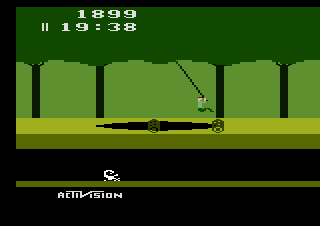
But by far the most "interesting" thing about the system was the graphics system. Unlike the NES, SNES, and pretty much all consoles and computers made in the last three decades, the 2600 had no video RAM to speak of. Instead of storing on-screen image data in video memory which is then composed by the graphics chip and output to the display, on the 2600 the video was drawn actively, one line at a time; by "actively" I mean that the game had to compose each line as it was drawn by the television. Each line, 160 pixels wide, was composed of 24 two-color background blocks, 2 eight-bit single-color bitmap sprites, 2 single-color line "missiles" whose colors mirror those of the sprites, and a line "ball" that was much like the missiles, but was the color of the background.

However, while the hardware was very (very) limited, the ability (or necessity, in this case) to change the screen contents while drawing was underway provided some flexibility for the clever programmer (just like with the NES and SNES). Clever use of the missiles and ball, changing each scan line, allowed for more complex graphics than you'd imagine given the hardware capabilities. By changing the sprite configuration you could have more than two sprites, though having more than two sprites on the same scan line required alternating between them each frame, resulting in flicker. Alternating palettes allowed the system to display 4 different colors on each line (out of a total of 128), as well as multicolored sprites and backgrounds. Clever use of the missiles and ball allowed for additional sprites per line, or multi-color and non-block backgrounds. Developers even found that they could expand the background to a full 48 blocks (the background is 48 blocks wide, but the background is only 24 bits, describing the left half of the screen; the right side is formed by repeating or mirroring the left side) by modifying the background registers halfway through the line.

Finally, the 2600 had sound analogous but inferior to the NES's. It had two channels of sound, one generating a square wave of varying pitch, the other white noise. In comparison, the NES had five channels: 2 square wave (used to approximate most melodic instruments in music), one triangle wave (often for bass or low-frequency strings), a noise channel (used for drums and other percussion), and a waveform channel (I'm not familiar with any instances of this being used by games).

Pac Man, showing off more than two sprites and 48-block-wide backgrounds:


Pitfall, showing off multi-colored sprites and backgrounds, as well as (possibly) non-block backgrounds: