A few weeks ago - before I got into cache-oblivious algorithms - I briefly had a different topic du jour. In particular, I had just learned about Low-Level Virtual Machine, and spent a couple days researching that.
LLVM is a bit hard to explain, because the boundary around what it is is rather fuzzy. To sum it up in a noun phrase, I'd say that LLVM is a modular compilation system and virtual machine. I say "compilation system" because it doesn't really consist of an actual compiler, and there's a lot of it that is outside the definition of a compiler.
The core idea is that you have a program in some programming language which is compiled into a platform and language independent intermediate format. From there, the program is translated into some machine code (whatever type is used on the machine it's being run on) at a later time, either during execution (just-in-time compiling) or prior to execution (e.g. an installer converting the application to native code when the program is installed), and executed. In that sense there's some similarity to the .NET platform and Java platform, though it isn't totally analogous to those.
LLVM is a collection of modules that makes the various parts of the process possible. These components form a redundant superset of a full system, so you can choose which you want for a particular purpose and leave the rest.
Going chronologically through that process, the first module in LLVM is its assembler. LLVM does not directly parse and compile any particular programming language. When creating a working compiler, you must create a language parser that processes a program and performs any language-specific optimizations. LLVM takes as its input a program in LLVM assembly plus various metadata that could be useful later in the process, and assembles them into language and platform independent LLVM intermediate bytecode. A few of the open-source parsers already available for LLVM include C, C++, Objective-C, and many others; there are even parsers under development that take .NET and Java bytecodes as input.
The LLVM assembly language differs substantially from the Java and .NET bytecode languages, and bears some resemblance to RISC assembly languages such as MIPS and PPC. LLVM assembly consists of an infinite set of Single Static Assignment (SSA) registers; each register can be assigned only once, and a new register must be allocated for the result of every computation. However, LLVM also stores a significant amount of metadata, such as call graphs and other things at a higher level than a simple assembly language, in the bytecode (language-dependent metadata provided by the compiler is also stored for later use by language-dependent modules, e.g. if a particular language has a runtime environment that needs more information than just the native code). This combination of the assembly language design and rich metadata allows the optimizer and native code generator to act much more effectively, in a language-independent manner, than if they were working on a bare assembly language. Yet they are compact enough to not be significantly larger than the equivalent native code alone.
The next step in the process is global optimization. LLVM implements a substantial number of language-independent optimization algorithms, and compiler writers can use some or all of them as they like. Because of the metadata stored with the assembly language, LLVM is not limited to dealing simply with assembly, and the effectiveness of it's optimization algorithms resembles that of a standalone compiler (e.g. Visual C++). Even better, because optimization occurs after the entire program has been assembled, LLVM can do whole-program optimizations (known as link-time code generation in VC++ and others) that are outside the ability of simple compilers that only look at a function or a source module at a time.
After optimization comes native code generation (or, alternately, you could interpret the bytecode without producing native code). This step takes the assembly and metadata that has undergone language and platform independent optimization and creates executable machine code, usually after performing platform-specific optimizations, and the code is then executed. Native code generators are language-independent, interchangeable modules invoked by LLVM and, given a program in LLVM bytecode, native code can be generated for any platform that a native code generation module exists for (x86 and PPC are a couple that are already supported with open-source implementations).
Finally, LLVM provides a runtime system that allows for various runtime tasks to be performed. We'll get to the other tasks later, but one to mention here is that this runtime system allows language or platform specific runtime environments to interface with LLVM-generated native code, as well as interfacing with system or dynamic link libraries. Language-dependent metadata provided by the language compiler in the distant past is also available for use here.
So, that's the basic process. However, as I've been describing the logical process and not the details, this description is much more linear than reality. As was mentioned, LLVM provides a number of modules that may be optionally used, and some are redundant. As well, there's also flexibility in how the modules interact.
LLVM especially provides a great deal of flexibility in the timing of optimization and native code generation. While LLVM can be used like a normal compiler, taking in LLVM assembly and generating an executable with native code that can be directly executed on the target platform, it does not need to be. It's equally possible to store the LLVM bytecode in a platform-independent "executable" and optimize it and compile it to native code at a later point, either on execution or prior to execution. LLVM can even compile individual functions to native code the first time they are called, allowing some portions of the program to potentially never be compiled at all.
Finally, LLVM also supports profiling and dynamic recompilation of a program. The LLVM runtime is capable of profiling the native code of the program at runtime, determining where the program spends most of its time, what functions are executed most often, etc. based on actual usage. It can then recompile the program from bytecode, either between executions or during idle time, using this profile data to perform optimizations based on actual usage.
So, that's squishy. But why should you care? Well, a few reasons. Probably the most attractive is that you can make a full, optimizing compiler for a language that will generate native code for many platforms simply by writing a parser and LLVM assembly generator - thousands of lines of code compared to hundreds of thousands or millions (see here for one example of this). Alternately, if you're designing a processor for some reason (work, school, or hobby), you can write a native code generator and instantly support all the languages parsers already exist for. And then there are some less obvious uses, such as using the metadata generated by LLVM to perform complex analysis of source code for the purpose of searching for bugs, security holes, etc.
LLVM is a free open-source project that may be used in free or commercial projects, open-source or proprietary. Its largest benefactor is Apple, who uses it extensively. Other companies such as Adobe also use it in various ways. For more information, see this brief summary of the LLVM system, and the LLVM web page.
Showing posts with label squishy. Show all posts
Showing posts with label squishy. Show all posts
Sunday, June 27, 2010


Wednesday, June 23, 2010
& Cache-Oblivious Algorithms (Updated)
Hey, does anybody remember the days when I actually wrote stuff on this blog? Those were good times.
Well, in case anybody actually remembers that far back, one of the things I'm known for is my topic du jour manner of self-education. I hear about some topic (or it comes up in some thought process), I research it for anywhere from a few days to a few months (however long it holds my interest), then I move on to some other topic. This week's topic du jour is cache-oblivious algorithms.
To explain what cache-oblivious algorithms are and why they're good, let's work through an example.
Suppose we've got a sorted array of 2^24 32-bit values, for a total size of 64 MB, and we need to determine if it contains a given value (if not, to find the nearest values). As we know that the list is sorted, binary search is the obvious choice, as it's known to be O(log N) complexity; note also that a sorted array is effectively an implicit binary search tree with items stored in-order, and the binary search is just a traversal of that tree. This complexity dictates that the search will require approximately log2(2^24) = 24 comparisons, each by definition involving a memory access (obviously, as the array is stored in memory).
Now consider a similar array containing 2^8 32-bit values (total size of 1 KB). According to the big O, a search through this array will take about 8 comparisons - 1/3 as many as the 2^24 array. Now, while these two numbers are accurate, they're highly misleading. By that measure, you'd expect it to take three times as long to perform the 2^24 search as the 2^8. It doesn't. In fact, the difference is well over an order of magnitude.
The reason for this discrepancy is the assumption that all memory accesses are equal. This is invalidated by the existence of processor (and other) caching, where cache hits are significantly faster than cache misses, as well as Non-Uniform Memory Architectures, where different memory banks have different access times for different processors. The 1 KB array can easily be held entirely in the processor's L1 cache, and in theory all accesses will be cache hits. The 64 MB array, on the other hand, can't even be held in L2 or L3 cache, so most memory accesses will be cache misses, and must go all the way to main memory.
Of course, main memory isn't that extreme of an example, as it isn't too much slower than processor cache. The real killer is when you have something (e.g. a database) that can't be held entirely in memory, and must be read from disk as needed (or worse, accessed over the internet at a speed that makes hard disks look fast). Hard drives are about a million times slower than RAM, meaning that each and every disk access is an excruciating performance hit, and the internet can be an order of magnitude worse.
Unsurprisingly, a massive amount of research effort over the last half a century has been in minimizing that amount that must be read from disk, especially in the class of cache-aware algorithms. Cache-aware algorithms are algorithms that are tuned (typically parametrized) for a specific system configuration (e.g. cache size) to achieve performance superior to algorithms that don't take such configuration into consideration.
One of the most common cache-aware algorithms, used in most file systems and database structures, is the B-tree (and family members), an upside-down (non-binary) search tree designed to minimize the number of disk accesses in searching data sets too large to fit entirely into memory. The B-tree is cache-aware because the block size can be adjusted to perform optimally on a given system configuration through either abstract math or actual benchmarks, and the optimal size for one configuration may perform poorly on another configuration.
Surprisingly, only in the last decade have people seriously investigated whether it is possible to create algorithms that make optimal use of a system configuration regardless of what exactly that configuration is, with no parametrization. This type of algorithm is called cache-oblivious algorithms.
Sometimes this is easy. A sequential scan of an array that does something on every element in order is cache-oblivious because it produces the provably minimum number of cache misses regardless of how the cache works. Divide and conquer algorithms that access each item in an array are also generally cache-oblivious and provably optimal because they ultimately divide enough to operate only on what's in a single cache line, regardless of what size the cache line is, before moving on to the next cache line (assuming, of course, that the size of each element is small in relation to the size of a cache line); in other words, they have a more or less linear scanning memory access pattern.
Binary search, however, is not cache-oblivious, as it's not a true divide and conquer algorithm in the sense that matters to us; specifically, it does not access all elements, and therefore does not get to take advantage of the predominant locality in the array. However, we can make a cache-oblivious implicit binary search tree by changing the ordering of items. To maximize performance, we want to lay out the nodes of the binary tree such that child nodes are as close as possible to their parents as often as possible, resulting in a minimal number of cache misses.
The key here is what's called the van Emde Boas layout (VEB) (you can tell I use HTTPS Everywhere because my Wikipedia links are all HTTPS). The basic idea is that the (triangular when drawn on paper) tree is divided recursively into (triangular) subtrees, with all nodes in each subtree being clustered together. This gives it a fractal structure with child and parent nodes being as close as possible to each other, maximizing cache locality during searches without needing to know the details of the cache system. A short tree in this form is shown below; below that is a comparison with trees in in-order, breadth-first (BFS), and depth-first search (DFS):


It's worth noting that cache-oblivious structures may or may not be as fast/faster than the simpler forms when the entire data set is in the same level of cache (whether you're talking about L1, RAM, etc.). One of the papers (the same one the images are from) examined the performance of static (non-changing) binary trees stored in in-order, BFS (an order that gives some cache locality while still being trivial to calculate child positions for), DFS, and VEB order, as well as two cache-aware search tree formats. In this experiment, the tree was stored in memory and cached in the processor cache - cache hits stay in the processor, cache misses go to main memory.
In the case of VEB, the complex fractal structure makes it nontrivial to calculate the position of a node's children in the array. As a result, when the entire data structure is in cache, calculation of child position takes longer than memory accesses, and VEB is about 40% slower than the standard in-order ordering. VEB begins to outperform in-order ordering once about half of the tree does not fit into cache; this calculation complexity problem can be overcome by storing child pointers with each node, but this is rather self-defeating, as this only multiplies the amount of data that has to be fit into the limited cache. In almost all cases, the cache-aware algorithms were superior to the others, but obviously require tuning to the particular cache, which is exactly what we're trying to avoid. BFS also performed admirably, always at least 15% faster than in-order ordering, and superior to VEB when more than ~1.5% of the data was able to fit into cache.
Another article compared a cache-oblivious binary heap based on VEB ordering with a standard binary heap using BFS ordering, in the context of a real-world internet page cache in actual use. Here, the heap is stored on (solid state) disk and cached in memory - cache hits go to memory while cache misses go to the disk. As in the previous benchmark, VEB performed 30% worse than the standard BFS when the entire tree could be stored in cache, but outperformed BFS when more than 0.2% of the tree was not stored in memory (I would guess this threshold is so low due to the many order of magnitude difference between memory and disk performance). At the other end, VEB peaked at 10x the speed of BFS when most of the tree was not cached. I imagine the reason this wasn't much higher was that in this real-world benchmark the priority queue was very small relative to the other data that is being accessed, and as such performance was dominated by other operations.
In the ~10 years researchers have been working on this, an array of cache-oblivious algorithms have been described, such as searching, sorting, linked lists, heaps, matrix multiplication and transposition, and various geometric algorithms such as 3D bounding volumes. The list of stuff I've seen so far (though not necessarily read through completely) is shown below, though I'm certain there are other things out there as well.
Cache-Efficient Layouts of Bounding Volume Hierarchies [and space partitioning]
Cache-Oblivious Algorithms (overview and survey)
Cache-Oblivious Algorithms and Data Structures (overview and survey)
Cache Oblivious Distribution Sweeping (sorting and various geometric algorithms)
Cache-Oblivious Dynamic Search Trees
Cache-Oblivious Priority Queue and Graph Algorithm Applications
Cache Oblivious Search Trees via Binary Trees of Small Height
You're Doing It Wrong (overview and heap algorithm applied to a real-life internet cache program)
Well, in case anybody actually remembers that far back, one of the things I'm known for is my topic du jour manner of self-education. I hear about some topic (or it comes up in some thought process), I research it for anywhere from a few days to a few months (however long it holds my interest), then I move on to some other topic. This week's topic du jour is cache-oblivious algorithms.
To explain what cache-oblivious algorithms are and why they're good, let's work through an example.
Suppose we've got a sorted array of 2^24 32-bit values, for a total size of 64 MB, and we need to determine if it contains a given value (if not, to find the nearest values). As we know that the list is sorted, binary search is the obvious choice, as it's known to be O(log N) complexity; note also that a sorted array is effectively an implicit binary search tree with items stored in-order, and the binary search is just a traversal of that tree. This complexity dictates that the search will require approximately log2(2^24) = 24 comparisons, each by definition involving a memory access (obviously, as the array is stored in memory).
Now consider a similar array containing 2^8 32-bit values (total size of 1 KB). According to the big O, a search through this array will take about 8 comparisons - 1/3 as many as the 2^24 array. Now, while these two numbers are accurate, they're highly misleading. By that measure, you'd expect it to take three times as long to perform the 2^24 search as the 2^8. It doesn't. In fact, the difference is well over an order of magnitude.
The reason for this discrepancy is the assumption that all memory accesses are equal. This is invalidated by the existence of processor (and other) caching, where cache hits are significantly faster than cache misses, as well as Non-Uniform Memory Architectures, where different memory banks have different access times for different processors. The 1 KB array can easily be held entirely in the processor's L1 cache, and in theory all accesses will be cache hits. The 64 MB array, on the other hand, can't even be held in L2 or L3 cache, so most memory accesses will be cache misses, and must go all the way to main memory.
Of course, main memory isn't that extreme of an example, as it isn't too much slower than processor cache. The real killer is when you have something (e.g. a database) that can't be held entirely in memory, and must be read from disk as needed (or worse, accessed over the internet at a speed that makes hard disks look fast). Hard drives are about a million times slower than RAM, meaning that each and every disk access is an excruciating performance hit, and the internet can be an order of magnitude worse.
Unsurprisingly, a massive amount of research effort over the last half a century has been in minimizing that amount that must be read from disk, especially in the class of cache-aware algorithms. Cache-aware algorithms are algorithms that are tuned (typically parametrized) for a specific system configuration (e.g. cache size) to achieve performance superior to algorithms that don't take such configuration into consideration.
One of the most common cache-aware algorithms, used in most file systems and database structures, is the B-tree (and family members), an upside-down (non-binary) search tree designed to minimize the number of disk accesses in searching data sets too large to fit entirely into memory. The B-tree is cache-aware because the block size can be adjusted to perform optimally on a given system configuration through either abstract math or actual benchmarks, and the optimal size for one configuration may perform poorly on another configuration.
Surprisingly, only in the last decade have people seriously investigated whether it is possible to create algorithms that make optimal use of a system configuration regardless of what exactly that configuration is, with no parametrization. This type of algorithm is called cache-oblivious algorithms.
Sometimes this is easy. A sequential scan of an array that does something on every element in order is cache-oblivious because it produces the provably minimum number of cache misses regardless of how the cache works. Divide and conquer algorithms that access each item in an array are also generally cache-oblivious and provably optimal because they ultimately divide enough to operate only on what's in a single cache line, regardless of what size the cache line is, before moving on to the next cache line (assuming, of course, that the size of each element is small in relation to the size of a cache line); in other words, they have a more or less linear scanning memory access pattern.
Binary search, however, is not cache-oblivious, as it's not a true divide and conquer algorithm in the sense that matters to us; specifically, it does not access all elements, and therefore does not get to take advantage of the predominant locality in the array. However, we can make a cache-oblivious implicit binary search tree by changing the ordering of items. To maximize performance, we want to lay out the nodes of the binary tree such that child nodes are as close as possible to their parents as often as possible, resulting in a minimal number of cache misses.
The key here is what's called the van Emde Boas layout (VEB) (you can tell I use HTTPS Everywhere because my Wikipedia links are all HTTPS). The basic idea is that the (triangular when drawn on paper) tree is divided recursively into (triangular) subtrees, with all nodes in each subtree being clustered together. This gives it a fractal structure with child and parent nodes being as close as possible to each other, maximizing cache locality during searches without needing to know the details of the cache system. A short tree in this form is shown below; below that is a comparison with trees in in-order, breadth-first (BFS), and depth-first search (DFS):

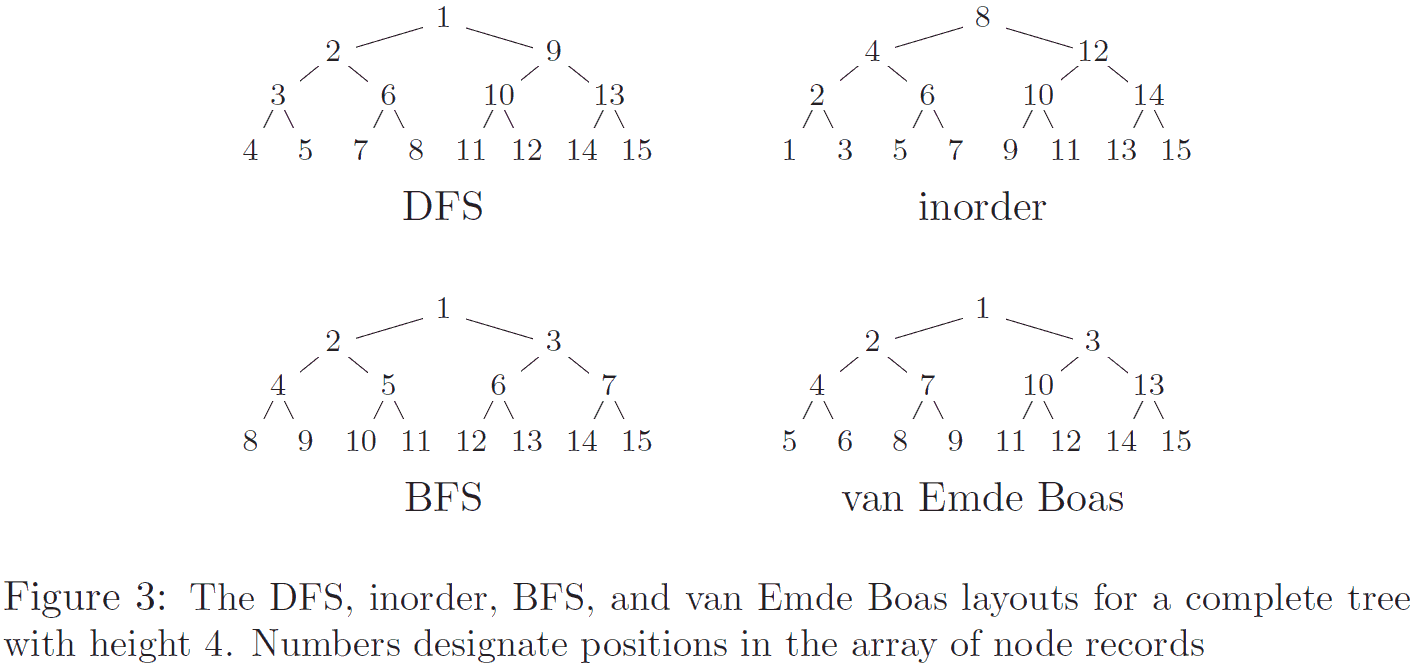
It's worth noting that cache-oblivious structures may or may not be as fast/faster than the simpler forms when the entire data set is in the same level of cache (whether you're talking about L1, RAM, etc.). One of the papers (the same one the images are from) examined the performance of static (non-changing) binary trees stored in in-order, BFS (an order that gives some cache locality while still being trivial to calculate child positions for), DFS, and VEB order, as well as two cache-aware search tree formats. In this experiment, the tree was stored in memory and cached in the processor cache - cache hits stay in the processor, cache misses go to main memory.
In the case of VEB, the complex fractal structure makes it nontrivial to calculate the position of a node's children in the array. As a result, when the entire data structure is in cache, calculation of child position takes longer than memory accesses, and VEB is about 40% slower than the standard in-order ordering. VEB begins to outperform in-order ordering once about half of the tree does not fit into cache; this calculation complexity problem can be overcome by storing child pointers with each node, but this is rather self-defeating, as this only multiplies the amount of data that has to be fit into the limited cache. In almost all cases, the cache-aware algorithms were superior to the others, but obviously require tuning to the particular cache, which is exactly what we're trying to avoid. BFS also performed admirably, always at least 15% faster than in-order ordering, and superior to VEB when more than ~1.5% of the data was able to fit into cache.
Another article compared a cache-oblivious binary heap based on VEB ordering with a standard binary heap using BFS ordering, in the context of a real-world internet page cache in actual use. Here, the heap is stored on (solid state) disk and cached in memory - cache hits go to memory while cache misses go to the disk. As in the previous benchmark, VEB performed 30% worse than the standard BFS when the entire tree could be stored in cache, but outperformed BFS when more than 0.2% of the tree was not stored in memory (I would guess this threshold is so low due to the many order of magnitude difference between memory and disk performance). At the other end, VEB peaked at 10x the speed of BFS when most of the tree was not cached. I imagine the reason this wasn't much higher was that in this real-world benchmark the priority queue was very small relative to the other data that is being accessed, and as such performance was dominated by other operations.
In the ~10 years researchers have been working on this, an array of cache-oblivious algorithms have been described, such as searching, sorting, linked lists, heaps, matrix multiplication and transposition, and various geometric algorithms such as 3D bounding volumes. The list of stuff I've seen so far (though not necessarily read through completely) is shown below, though I'm certain there are other things out there as well.
Cache-Efficient Layouts of Bounding Volume Hierarchies [and space partitioning]
Cache-Oblivious Algorithms (overview and survey)
Cache-Oblivious Algorithms and Data Structures (overview and survey)
Cache Oblivious Distribution Sweeping (sorting and various geometric algorithms)
Cache-Oblivious Dynamic Search Trees
Cache-Oblivious Priority Queue and Graph Algorithm Applications
Cache Oblivious Search Trees via Binary Trees of Small Height
You're Doing It Wrong (overview and heap algorithm applied to a real-life internet cache program)
Sunday, March 28, 2010
& StarCraft 2
I really should have posted this weeks ago, but IskatuMesk (user mancatcher, on YouTube) has being doing a series of YouTube posts of SC2 games with commentary. Many of the replays are in 1080 high-definition, although I only watch the 480 resolution versions, as that's all my 1.5 Mbps DSL can support in real-time, and it's okay, clarity-wise. I've been watching just about everything he's posted since he started covering it.
The vast majority of them are of high or mid/high-level players. A lot of them are games (usually free-for-alls) he plays in, himself. He's in the platinum league (currently the highest, with gold, silver, bronze, and copper below), which puts him in the mid/high skill category. Others, however, are commentaries on replays of really famous SC1 pro players, frequently obtained from Team Liquid's forum.
On one or two occasions you see him getting in-game messages from me (some of which make absolutely no sense, like when I was testing out what the mature language filter blocks - e.g. "XonX" and "came" - which he had disabled). One replay, however, is a 2on2 I actually played. Now, I'm in the silver league, so this is not exactly a replay displaying master strategy (and I get my ass handed to me by Mesk's commentary of the match, which is kind of amusing in its own way). It does, however, have an absolutely hilarious ending, as indicated by the stuff people have said about it (e.g. "oh god im dying over here", "Holy shit. I teared up at the end there", "dear god that was amazing", "Most hilarious ending evar"). Amusingly, this replay has proven his most popular, and has almost 3x as many views as almost all of the other replays of the same age; I wonder if it got posted on a forum with a couple thousand users, somewhere.
Part 1
Part 2
Oh, and since the ending is kind of ambiguous: my team won.
The vast majority of them are of high or mid/high-level players. A lot of them are games (usually free-for-alls) he plays in, himself. He's in the platinum league (currently the highest, with gold, silver, bronze, and copper below), which puts him in the mid/high skill category. Others, however, are commentaries on replays of really famous SC1 pro players, frequently obtained from Team Liquid's forum.
On one or two occasions you see him getting in-game messages from me (some of which make absolutely no sense, like when I was testing out what the mature language filter blocks - e.g. "XonX" and "came" - which he had disabled). One replay, however, is a 2on2 I actually played. Now, I'm in the silver league, so this is not exactly a replay displaying master strategy (and I get my ass handed to me by Mesk's commentary of the match, which is kind of amusing in its own way). It does, however, have an absolutely hilarious ending, as indicated by the stuff people have said about it (e.g. "oh god im dying over here", "Holy shit. I teared up at the end there", "dear god that was amazing", "Most hilarious ending evar"). Amusingly, this replay has proven his most popular, and has almost 3x as many views as almost all of the other replays of the same age; I wonder if it got posted on a forum with a couple thousand users, somewhere.
Part 1
Part 2
Oh, and since the ending is kind of ambiguous: my team won.
Monday, March 22, 2010
Q's Squishy Thing of the Day
One of the manga series I've been waiting forever for an English translation of (to buy, that is; fan-translated versions have been around online for years) is Elfen Lied, which I mentioned being fond of in the past. Well, there's still not official English translation, but I just learned something very interesting: there's an official Spanish version (also German and Taiwanese Chinese, for speakers of those languages). So I can own the series I've wanted for a long time, while practicing my Spanish.
I mentioned a ways back that I was reading the Spanish version of the Trique grammar book (as there wasn't an equivalent English version), and I was surprised how well I could read the Spanish, without even looking things up. However, a part of the reason this went so smoothly was that most of the unknown words in that were linguistic jargon that I was able to figure out from context very quickly.
Actually, my very first exposure to Trique, prior to that, also involved Spanish. It all began with a Spanish/Trique bilingual Bible I got from my grandpa. I started by comparing the text in Spanish and Trique to attempt to figure out the grammar by example. This was somewhat more difficult than the grammar book. It had a much broader array of words used, so it was significantly harder to figure out unknown words from context. Still, I made a respectable amount of progress, given the method.
If I'm lucky, reading Elfen Lied would be closer to the former, as the illustrations give some context. But even if I infrequently need to look things up it wouldn't be too bad. And it would very likely improve my ability to read/write Spanish in general by a noteworthy amount.
So, I'll probably buy that after money is no longer so tight.
I mentioned a ways back that I was reading the Spanish version of the Trique grammar book (as there wasn't an equivalent English version), and I was surprised how well I could read the Spanish, without even looking things up. However, a part of the reason this went so smoothly was that most of the unknown words in that were linguistic jargon that I was able to figure out from context very quickly.
Actually, my very first exposure to Trique, prior to that, also involved Spanish. It all began with a Spanish/Trique bilingual Bible I got from my grandpa. I started by comparing the text in Spanish and Trique to attempt to figure out the grammar by example. This was somewhat more difficult than the grammar book. It had a much broader array of words used, so it was significantly harder to figure out unknown words from context. Still, I made a respectable amount of progress, given the method.
If I'm lucky, reading Elfen Lied would be closer to the former, as the illustrations give some context. But even if I infrequently need to look things up it wouldn't be too bad. And it would very likely improve my ability to read/write Spanish in general by a noteworthy amount.
So, I'll probably buy that after money is no longer so tight.
Sunday, March 21, 2010
Q's Squishy Thing of the Day
Just saw this today. Perhaps nobody else will find it interesting, but I do.
Essential WoW terminology in other languages
Essential WoW terminology in other languages
Thursday, February 25, 2010
Q's Squishy Thing of the Day
Meet ShadyURL. It encodes URLs in things that look like spam, porn, malware, and cults/racism. Some of the things I've linked to various people in the last day:
http://5z8.info/PIN-phisher_a1x6x_nakedgrandmas.jpg
http://5z8.info/double-your-wang_z2f4t_nazi
http://5z8.info/worm.exe_i8k3z_stalin-will-rise-again
http://5z8.info/killallimmigrants_x2l9n_protocols-of-the-elders-of-zion.doc (best URL so far)
http://5z8.info/OPI423098BVMPEMBUDSGND423098889708807909788079_k3j7r_dogporn
And, just for fun, here's the Copyright Alliance blog: http://5z8.info/pirate-anything_w2x9e_racist-raps
And this blog: http://5z8.info/whitepower_o3q2x_inject_worm, which is awesome, because I'm actually 3/4 German
And yes, I have been made aware that I'm late to the party on this one.
http://5z8.info/PIN-phisher_a1x6x_nakedgrandmas.jpg
http://5z8.info/double-your-wang_z2f4t_nazi
http://5z8.info/worm.exe_i8k3z_stalin-will-rise-again
http://5z8.info/killallimmigrants_x2l9n_protocols-of-the-elders-of-zion.doc (best URL so far)
http://5z8.info/OPI423098BVMPEMBUDSGND423098889708807909788079_k3j7r_dogporn
And, just for fun, here's the Copyright Alliance blog: http://5z8.info/pirate-anything_w2x9e_racist-raps
And this blog: http://5z8.info/whitepower_o3q2x_inject_worm, which is awesome, because I'm actually 3/4 German
And yes, I have been made aware that I'm late to the party on this one.
Thursday, February 04, 2010
& Solid State Stuff
Pretty soon I'm going to be looking to upgrade some things on my computer, starting with the hard drive. In addition to getting a large disk to begin using for archived anime (as opposed to the large stack of DVDs I've burned), I was going to get a solid-state disk to put my Windows 7 that I won in a raffle a couple weeks ago on.
For anyone not familiar with them, SSDs have the benefit that they have 0 seek time (as opposed to about 9 ms for HDs), combined with linear read speeds several times that of HDs. For very large and contiguous files, which involve only linear access, an SSD could be 3 or 4x as fast as an HD. But for accessing large numbers of small, non-contiguous files, which involve many seeks, the difference is much, much larger. Thus SSDs can be anywhere from substantially faster to massively faster than HDs, depending on the type of access.
But what exactly do I do with the SSD when I get it? Prior to Wednesday, the answer was obvious: use it as my boot drive. That is, put Windows and frequently used programs on it, and use a separate HD to put large and infrequently used stuff on.
Today, however, there's another option, thanks to the announcement of this evil little thing: a disk controller which combines an HD and an SSD, using the SSD as a massive cache for the much larger HD. That is, instead of having the SSD serve as a dedicated boot drive, it's used to cache frequently used files from all over the HD (when talking about an 80 gig cache, "frequently" probably amounts to once every week or two).
One obvious advantage is that the superior performance of the SSD is applied not just to system files (e.g. Windows), but also to anything on the disk that gets used frequently. Similarly, you don't need to let part of the SSD go to waste if you don't have enough files to fill it up (I'm told using an SSD as your boot drive takes 30-40 gigs of SSD, while higher end SSDs go up to 256 gigs). Another big benefit is that you don't have to manually split files that are normally on the boot drive (e.g. Program Files and the Users documents folder) between the SSD and HD depending on whether you want them fast or slow; for example, I wouldn't want to put downloaded anime on my (dedicated) SSD, nor would I want my SSD bloated with the various bulky compiler intermediates.
Now, the big question is how exactly this is going to work. According to the manufacturer, it requires a driver for Windows in order to work. This suggests that caching may all be done in software, rather than hardware. This brings up the obvious question: in what cases the cache will be used? If the cache is only used within the current Windows boot (essentially serving as a gigantic system cache), this won't be very useful, at least for me (perhaps for a database server, with multiple terabytes of database, a 100+ gig cache would be substantially beneficial). I already have 8 gigs of RAM, about 4 of which (at a minimum) is available to be used by the system cache, which is a pretty decent cache for one session (and RAM is much faster than an SSD, anyway).
From the write-up, however, it sounds like the cache at least persists between Windows boots, which would mean it wouldn't quite be that bad. However, if the caching is all software-based via a Windows driver, this obviously means that it won't be of any benefit prior to loading that driver - that is, during boot up/shut down and going into/out of hibernate, which are things I was hoping to gain out of getting an SSD.
I guess we'll find out when the thing ships, in 3 weeks or so.
For anyone not familiar with them, SSDs have the benefit that they have 0 seek time (as opposed to about 9 ms for HDs), combined with linear read speeds several times that of HDs. For very large and contiguous files, which involve only linear access, an SSD could be 3 or 4x as fast as an HD. But for accessing large numbers of small, non-contiguous files, which involve many seeks, the difference is much, much larger. Thus SSDs can be anywhere from substantially faster to massively faster than HDs, depending on the type of access.
But what exactly do I do with the SSD when I get it? Prior to Wednesday, the answer was obvious: use it as my boot drive. That is, put Windows and frequently used programs on it, and use a separate HD to put large and infrequently used stuff on.
Today, however, there's another option, thanks to the announcement of this evil little thing: a disk controller which combines an HD and an SSD, using the SSD as a massive cache for the much larger HD. That is, instead of having the SSD serve as a dedicated boot drive, it's used to cache frequently used files from all over the HD (when talking about an 80 gig cache, "frequently" probably amounts to once every week or two).
One obvious advantage is that the superior performance of the SSD is applied not just to system files (e.g. Windows), but also to anything on the disk that gets used frequently. Similarly, you don't need to let part of the SSD go to waste if you don't have enough files to fill it up (I'm told using an SSD as your boot drive takes 30-40 gigs of SSD, while higher end SSDs go up to 256 gigs). Another big benefit is that you don't have to manually split files that are normally on the boot drive (e.g. Program Files and the Users documents folder) between the SSD and HD depending on whether you want them fast or slow; for example, I wouldn't want to put downloaded anime on my (dedicated) SSD, nor would I want my SSD bloated with the various bulky compiler intermediates.
Now, the big question is how exactly this is going to work. According to the manufacturer, it requires a driver for Windows in order to work. This suggests that caching may all be done in software, rather than hardware. This brings up the obvious question: in what cases the cache will be used? If the cache is only used within the current Windows boot (essentially serving as a gigantic system cache), this won't be very useful, at least for me (perhaps for a database server, with multiple terabytes of database, a 100+ gig cache would be substantially beneficial). I already have 8 gigs of RAM, about 4 of which (at a minimum) is available to be used by the system cache, which is a pretty decent cache for one session (and RAM is much faster than an SSD, anyway).
From the write-up, however, it sounds like the cache at least persists between Windows boots, which would mean it wouldn't quite be that bad. However, if the caching is all software-based via a Windows driver, this obviously means that it won't be of any benefit prior to loading that driver - that is, during boot up/shut down and going into/out of hibernate, which are things I was hoping to gain out of getting an SSD.
I guess we'll find out when the thing ships, in 3 weeks or so.
Monday, December 28, 2009
& Modern Things Part 3
So yeah, the Xbox 360 is pretty uninteresting, apart from the memory limitation. Fortunately, the third and final thing you can program with XNA is rather interesting: the Zune. The Zune is Microsoft's answer to the iPod: a portable music player. However, the Zune is also capable of running third-party programs through XNA. This makes it rather interesting, as it gives you the best taste of what it was like to program a console in the past (back before console CPUs were in the GHz and memory was in the hundreds of megs), as it has some of the same programming considerations (or at least moreso than the 360 or PC).
There are a few different models of Zune with different capabilities, which can be separated into what I'll call the 'Zune' (the first several models, which are pretty much identical for our purposes), and the recent Zune HD.

The Zune series is shown above. Members of the series vary in exact design, but all have a few common features. All models have a low-power ARM CPU, 64 megs of RAM, and has the ability to do basic bitmap graphics. They contain a 240x320 LCD screen in 3:4 aspect ratio (the screen size varies from 1.8 to 3.2 inches, diagonal), running at 30 FPS (some high-end models also support 60 FPS). For input, each has a circular pad as well as one button to each side of the pad.
These features give the Zune a unique set of programming considerations. Obviously, the CPU is drastically less powerful than on the PC or Xbox 360. Games have a quota of 16 megs of RAM usage, in which both code and data must fit (although as this is only 1/4 of the total RAM of the Zune, garbage collection overhead is much less of a problem, and you should be able to use all 16 megs without seeing too much garbage collection slowdown). Graphics are limited to 2D sprite-based operations, and screen space is very limited (the Zune actually has a quite impressive display resolution for its screen size, but it's still tiny). Of course, the fact that this is a portable system means that battery life is also an issue. But perhaps the most tricky issue is the input system.
The Zune is designed to be used standing up, as shown in the above picture. In this orientation, the screen is taller than it is wide. Control can use both thumbs, with one thumb on one button, and the other thumb shared between the circular pad and the second button. However, as games typically are designed around a screen that is wider than it is tall, this configuration comes off as somewhat unnatural, though some games are more appropriate for this than others (e.g. a top-down shooter would have no problems, here).
Alternately, the Zune may be turned on its side, yielding the standard 4:3 aspect ratio used on everything prior to high-definition televisions and wide-screen monitors. The chief problem with this configuration, then, becomes control. Due to the button configuration of the Zune, this configuration allows only one thumb for input, shared between the circular pad and the two buttons. This has the effect of drastically reducing the potential complexity of gameplay input, as it's far more cumbersome to switch between buttons than to simply have a second thumb take care of one of them.

The Zune HD is shown above. You could really call this the Zune 2 (or, if you're Nintendo, the Super Zune), as it's almost entirely different from the previously mentioned Zune series. It's powered by an nVidia Tegra (2600), a system on a chip which both acts as an (ARM) CPU and a GPU capable of 3D graphics (although thus far XNA does not support 3D on the Zune HD). As far as I know, the amount of memory on the HD has not been published, though it's safe to say it has at least 64 megs RAM. While the screen is only 3.3 inches (about the same as the higher-end Zunes), the screen is now 480x272 (when laid sideways) in the HDTV 16:9 aspect ratio.
Perhaps most significant, however, and the reason the Zune is much more interesting than the PC and Xbox 360, is the change in input system. As can be seen in the image, the Zune HD has no buttons or other controls. Instead, the HD features two new input methods: a multi-touch display and an accelerometer.
For those not familiar with it, multi-touch displays are a type of touch-screen, which take as input a point on the screen and the pressure exerted on the screen at that point. Multi-touch takes this to the next level by allowing multiple points of contact, including tracking of movement of each point. This allows for very flexible and powerful input, permitting such interfaces as "point and click" via pressing the screen at a point, dragging and dropping, and things such as gestures. This even allows interfaces such as the one seen in Minority Report (and other sci-fi-ish depictions), where multiple points of contact with the touch screen can be used to grab and move, rotate, or resize items on screen (this type of interface exists in the Microsoft Surface and other multi-touch devices; also, be sure to check out the Dungeons and Dragons on Surface demonstration).
You might not be able to guess what an accelerometer is, based only on the name: obviously it measures acceleration, but unless you're into physics, you probably wouldn't make the connection with gravity. Technically, holding an object in air (as opposed to letting it free-fall) requires an upward force to be applied to the object, and a force produces acceleration. An accelerometer measures this acceleration against the force of gravity; in other words, an accelerometer measures which direction is up, based on the orientation of the device. Of course, it also detects other types of acceleration, such as movement in space, as well. Between the possibilities, this allows a number of interesting (and impossible, with traditional input methods) input systems, such a basing the in-game camera on position and/or orientation of the Zune, actions triggered by bumping or shaking, etc.
Microsoft makes the multi-touch screen and accelerometer available in XNA through the XNA Zune Extensions addon. Once you've downloaded that, search the help for Zune HD Input Overview for general information about support. After that, zunezune.org has posted a helpful simple "game" that demonstrates multi-touch and accelerometer: the code is available here, and a video of the program in action is below. Finally, Platformer: Adding Touch Support (also in Extensions help) is a tutorial that shows you how to add multi-touch and accelerometer support to the platformer starter kit.
There are a few different models of Zune with different capabilities, which can be separated into what I'll call the 'Zune' (the first several models, which are pretty much identical for our purposes), and the recent Zune HD.

The Zune series is shown above. Members of the series vary in exact design, but all have a few common features. All models have a low-power ARM CPU, 64 megs of RAM, and has the ability to do basic bitmap graphics. They contain a 240x320 LCD screen in 3:4 aspect ratio (the screen size varies from 1.8 to 3.2 inches, diagonal), running at 30 FPS (some high-end models also support 60 FPS). For input, each has a circular pad as well as one button to each side of the pad.
These features give the Zune a unique set of programming considerations. Obviously, the CPU is drastically less powerful than on the PC or Xbox 360. Games have a quota of 16 megs of RAM usage, in which both code and data must fit (although as this is only 1/4 of the total RAM of the Zune, garbage collection overhead is much less of a problem, and you should be able to use all 16 megs without seeing too much garbage collection slowdown). Graphics are limited to 2D sprite-based operations, and screen space is very limited (the Zune actually has a quite impressive display resolution for its screen size, but it's still tiny). Of course, the fact that this is a portable system means that battery life is also an issue. But perhaps the most tricky issue is the input system.
The Zune is designed to be used standing up, as shown in the above picture. In this orientation, the screen is taller than it is wide. Control can use both thumbs, with one thumb on one button, and the other thumb shared between the circular pad and the second button. However, as games typically are designed around a screen that is wider than it is tall, this configuration comes off as somewhat unnatural, though some games are more appropriate for this than others (e.g. a top-down shooter would have no problems, here).
Alternately, the Zune may be turned on its side, yielding the standard 4:3 aspect ratio used on everything prior to high-definition televisions and wide-screen monitors. The chief problem with this configuration, then, becomes control. Due to the button configuration of the Zune, this configuration allows only one thumb for input, shared between the circular pad and the two buttons. This has the effect of drastically reducing the potential complexity of gameplay input, as it's far more cumbersome to switch between buttons than to simply have a second thumb take care of one of them.

The Zune HD is shown above. You could really call this the Zune 2 (or, if you're Nintendo, the Super Zune), as it's almost entirely different from the previously mentioned Zune series. It's powered by an nVidia Tegra (2600), a system on a chip which both acts as an (ARM) CPU and a GPU capable of 3D graphics (although thus far XNA does not support 3D on the Zune HD). As far as I know, the amount of memory on the HD has not been published, though it's safe to say it has at least 64 megs RAM. While the screen is only 3.3 inches (about the same as the higher-end Zunes), the screen is now 480x272 (when laid sideways) in the HDTV 16:9 aspect ratio.
Perhaps most significant, however, and the reason the Zune is much more interesting than the PC and Xbox 360, is the change in input system. As can be seen in the image, the Zune HD has no buttons or other controls. Instead, the HD features two new input methods: a multi-touch display and an accelerometer.
For those not familiar with it, multi-touch displays are a type of touch-screen, which take as input a point on the screen and the pressure exerted on the screen at that point. Multi-touch takes this to the next level by allowing multiple points of contact, including tracking of movement of each point. This allows for very flexible and powerful input, permitting such interfaces as "point and click" via pressing the screen at a point, dragging and dropping, and things such as gestures. This even allows interfaces such as the one seen in Minority Report (and other sci-fi-ish depictions), where multiple points of contact with the touch screen can be used to grab and move, rotate, or resize items on screen (this type of interface exists in the Microsoft Surface and other multi-touch devices; also, be sure to check out the Dungeons and Dragons on Surface demonstration).
You might not be able to guess what an accelerometer is, based only on the name: obviously it measures acceleration, but unless you're into physics, you probably wouldn't make the connection with gravity. Technically, holding an object in air (as opposed to letting it free-fall) requires an upward force to be applied to the object, and a force produces acceleration. An accelerometer measures this acceleration against the force of gravity; in other words, an accelerometer measures which direction is up, based on the orientation of the device. Of course, it also detects other types of acceleration, such as movement in space, as well. Between the possibilities, this allows a number of interesting (and impossible, with traditional input methods) input systems, such a basing the in-game camera on position and/or orientation of the Zune, actions triggered by bumping or shaking, etc.
Microsoft makes the multi-touch screen and accelerometer available in XNA through the XNA Zune Extensions addon. Once you've downloaded that, search the help for Zune HD Input Overview for general information about support. After that, zunezune.org has posted a helpful simple "game" that demonstrates multi-touch and accelerometer: the code is available here, and a video of the program in action is below. Finally, Platformer: Adding Touch Support (also in Extensions help) is a tutorial that shows you how to add multi-touch and accelerometer support to the platformer starter kit.
Friday, December 18, 2009
& Modern Things Part 1
One thing that has always kind of mystified me is the degree of inaccessibility maintained about video game console development. For almost every single video game console in history, getting access to the manufacturer's developer documentation and hardware requires that you be licensed (and it sucks to be you if the manufacturer doesn't like you) and have a large sum of money for the development kits; for most systems, the accessibility of the system to lone hobbyists has been 0.
Of course, eventually the system, if there's enough interest, is reverse-engineered, and unofficial documentation is put up on the internet (and perhaps followed by law suits). But such documentation is usually incomplete, inaccurate, or just plain badly written, and there's almost always anti-piracy lockout mechanisms that prevent you from actually running any code you manage to write on the system itself.
This is a strikingly odd decision, and seemingly self-destructive. Many software companies turn a blind eye to piracy among college students because they realize that students pirating their programs in college, when they couldn't afford to buy the programs, anyway, makes them more likely to use them professionally, when they do have money to purchase the programs. Some companies even give away their programs to students for educational purposes, for the very same reason: more student users that get the program for free means more buyers after graduation. Economically, it's a simple business investment, trading theoretical income now, which they couldn't collect anyway, for greater actual income later.
This situation on consoles is no different. If you promote hobbyist development on your game console, that increases the probability that those hobbyists will develop on your console when they go pro. This is especially applicable considering that the modern game console business model is to sell the consoles at a loss, then make up that loss in licensing of games; thus, every additional game developed for your system equals more money for you. Ultimately, I suspect the reason for this odd behavior lies in the lockout mechanism: in order to allow hobbyists to develop for the console, the console cannot have a lockout mechanism, which would make it much easier to pirate games.
Anyway, there are only a couple exceptions to this rule, that I know of. Sony published a mini developer kit for the Playstation, called the Net Yaroze, for about a grand, which included a black development version of the system (lacking the lockout hardware), various documentation (I don't know if this was the same or inferior to the professional documentation), some run-time libraries (probably inferior to the professional kits) and software to get custom code onto the Yaroze. Of course, anything you write could only be run by people with their own Yaroze, due to the lockout system.
Very surprisingly, only in the last couple years has anyone actually targeted non-professionals as serious developers for their system. Of course I'm talking about XNA (official site). XNA is a free game programming framework built on top of the .NET platform. Games are written in C# in Visual C#, and make use of the .NET and XNA class libraries. The .NET libraries (a subset, to be precise) provide general support code such as data structures and multi-threading, and the XNA libraries cover hardware access, such as graphics and sound, and various support routines too game-specific for the .NET libraries, such as quaternions and interpolated curves. Use of the .NET framework also provides things such as garbage collection, that make programming easier and faster; the use of non-native code and APIs also means that, if code is written carefully, a single game can be compiled and run on all three platforms XNA supports: Windows, Xbox 360, and the Zune (the fine print: development on the 360 requires a Creators Club Premium subscription; membership is available to anyone, but costs $100/year).
Unlike the completely unrelated, professional Xbox 360 Software Developer Kit, XNA is targeted specifically at hobbyists and independent developers (e.g. a person who writes a small game and wants to sell it for cheap). Microsoft runs an active community site containing Microsoft-written code samples, tutorials, and starter kits (e.g. a 2D RPG and a 3D racing game), and forums where both hobbyists and XNA developers post. There are also third-party XNA tutorial/code sites, though Ziggyware, the largest and best, imploded a ways back (humorously, according to Google, Ziggyware and a few others had posted the presentation I wrote on kd-trees as part of my graphics term project, prior to the site going under).
Once a game is finished, in addition to distributing the source and/or binaries manually, finished games can be submitted to several places, depending on platform. Free Windows games may be submitted to the XNA community website for download. Finished games can also be submitted to the Xbox Live Marketplace, where they can be downloaded, either for free or for sale (whatever you decide on), by anyone who has an Xbox 360 (a Creators Club subscription is not required to play games published on the Marketplace). To say that again: you can sell your amateur Xbox games for cash through Live Marketplace, right next to professional downloadable games.
Of course, this isn't without its caveats. XNA doesn't allow you to directly access the hardware, or use the same low-level API professional developers use from a natively-executed (after compiling) language like C++. This means that XNA games cannot compete in sheer speed and power with professionally-developed games. It also means that you may not be able to access 100% of the features of the hardware, where XNA only exposes a portion of the feature set; one very notable omission is the ability to use the Xbox 360's vector math unit, a fact that drastically reduces the performance potential for some types of calculations.
Second is the fact that it's a .NET platform. While this choice was good from an ease of programming perspective (garbage collection is easier to program and less prone to various coding errors, especially given that most of the people coding on XNA will be amateurs and thus may not be very good), it's not so good from a performance perspective. Perhaps the most stereotypical problem for garbage-collected systems like Java or the .NET platform is that garbage collection is far from free, both in terms of CPU and memory. If you plot the proportion of time the CPU spends collecting garbage (instead of, you know, actually running the program) against memory usage, you'll find that after a certain threshold cost grows exponentially. One study found that, when memory utilization is at 20%, garbage collection is no more expensive (and maybe even faster) than explicit allocation/deletion, but costs rise quickly from there: garbage collection is 17% slower at 33% memory usage, 70% slower at 50% memory usage, and as you approach 100% memory utilization garbage collection approaches 100% of total CPU time.
A third major point of concern is that the XNA framework on the Xbox 360 does not have the full .NET framework/compiler, but only the Compact Framework. This version is designed for hardware that doesn't have a lot of memory or processing power (especially things like PDAs), and offers reduced memory and CPU overhead at the price of sub-optimal execution speed. Of the various optimizations performed by the full-fledged .NET framework, only a subset are performed by the compact framework; for example, inlining is restricted, virtual function calls are implemented in a more compact but slower manner, and both the framework and garbage collection algorithm are just dumber in general, to name a few issues (see here for a more lengthy list).
However, making decisions is easy when there's only one option, and if you're a hobbyist wanting to code for a modern video game console, that option is XNA. Even if you're not interested in consoles, XNA still provides a convenient and free game development platform, designed specifically with hobbyists in mind. It also opens the possibility of making a bit of money off your amateur games prior to going pro.
Of course, eventually the system, if there's enough interest, is reverse-engineered, and unofficial documentation is put up on the internet (and perhaps followed by law suits). But such documentation is usually incomplete, inaccurate, or just plain badly written, and there's almost always anti-piracy lockout mechanisms that prevent you from actually running any code you manage to write on the system itself.
This is a strikingly odd decision, and seemingly self-destructive. Many software companies turn a blind eye to piracy among college students because they realize that students pirating their programs in college, when they couldn't afford to buy the programs, anyway, makes them more likely to use them professionally, when they do have money to purchase the programs. Some companies even give away their programs to students for educational purposes, for the very same reason: more student users that get the program for free means more buyers after graduation. Economically, it's a simple business investment, trading theoretical income now, which they couldn't collect anyway, for greater actual income later.
This situation on consoles is no different. If you promote hobbyist development on your game console, that increases the probability that those hobbyists will develop on your console when they go pro. This is especially applicable considering that the modern game console business model is to sell the consoles at a loss, then make up that loss in licensing of games; thus, every additional game developed for your system equals more money for you. Ultimately, I suspect the reason for this odd behavior lies in the lockout mechanism: in order to allow hobbyists to develop for the console, the console cannot have a lockout mechanism, which would make it much easier to pirate games.
Anyway, there are only a couple exceptions to this rule, that I know of. Sony published a mini developer kit for the Playstation, called the Net Yaroze, for about a grand, which included a black development version of the system (lacking the lockout hardware), various documentation (I don't know if this was the same or inferior to the professional documentation), some run-time libraries (probably inferior to the professional kits) and software to get custom code onto the Yaroze. Of course, anything you write could only be run by people with their own Yaroze, due to the lockout system.
Very surprisingly, only in the last couple years has anyone actually targeted non-professionals as serious developers for their system. Of course I'm talking about XNA (official site). XNA is a free game programming framework built on top of the .NET platform. Games are written in C# in Visual C#, and make use of the .NET and XNA class libraries. The .NET libraries (a subset, to be precise) provide general support code such as data structures and multi-threading, and the XNA libraries cover hardware access, such as graphics and sound, and various support routines too game-specific for the .NET libraries, such as quaternions and interpolated curves. Use of the .NET framework also provides things such as garbage collection, that make programming easier and faster; the use of non-native code and APIs also means that, if code is written carefully, a single game can be compiled and run on all three platforms XNA supports: Windows, Xbox 360, and the Zune (the fine print: development on the 360 requires a Creators Club Premium subscription; membership is available to anyone, but costs $100/year).
Unlike the completely unrelated, professional Xbox 360 Software Developer Kit, XNA is targeted specifically at hobbyists and independent developers (e.g. a person who writes a small game and wants to sell it for cheap). Microsoft runs an active community site containing Microsoft-written code samples, tutorials, and starter kits (e.g. a 2D RPG and a 3D racing game), and forums where both hobbyists and XNA developers post. There are also third-party XNA tutorial/code sites, though Ziggyware, the largest and best, imploded a ways back (humorously, according to Google, Ziggyware and a few others had posted the presentation I wrote on kd-trees as part of my graphics term project, prior to the site going under).
Once a game is finished, in addition to distributing the source and/or binaries manually, finished games can be submitted to several places, depending on platform. Free Windows games may be submitted to the XNA community website for download. Finished games can also be submitted to the Xbox Live Marketplace, where they can be downloaded, either for free or for sale (whatever you decide on), by anyone who has an Xbox 360 (a Creators Club subscription is not required to play games published on the Marketplace). To say that again: you can sell your amateur Xbox games for cash through Live Marketplace, right next to professional downloadable games.
Of course, this isn't without its caveats. XNA doesn't allow you to directly access the hardware, or use the same low-level API professional developers use from a natively-executed (after compiling) language like C++. This means that XNA games cannot compete in sheer speed and power with professionally-developed games. It also means that you may not be able to access 100% of the features of the hardware, where XNA only exposes a portion of the feature set; one very notable omission is the ability to use the Xbox 360's vector math unit, a fact that drastically reduces the performance potential for some types of calculations.
Second is the fact that it's a .NET platform. While this choice was good from an ease of programming perspective (garbage collection is easier to program and less prone to various coding errors, especially given that most of the people coding on XNA will be amateurs and thus may not be very good), it's not so good from a performance perspective. Perhaps the most stereotypical problem for garbage-collected systems like Java or the .NET platform is that garbage collection is far from free, both in terms of CPU and memory. If you plot the proportion of time the CPU spends collecting garbage (instead of, you know, actually running the program) against memory usage, you'll find that after a certain threshold cost grows exponentially. One study found that, when memory utilization is at 20%, garbage collection is no more expensive (and maybe even faster) than explicit allocation/deletion, but costs rise quickly from there: garbage collection is 17% slower at 33% memory usage, 70% slower at 50% memory usage, and as you approach 100% memory utilization garbage collection approaches 100% of total CPU time.
A third major point of concern is that the XNA framework on the Xbox 360 does not have the full .NET framework/compiler, but only the Compact Framework. This version is designed for hardware that doesn't have a lot of memory or processing power (especially things like PDAs), and offers reduced memory and CPU overhead at the price of sub-optimal execution speed. Of the various optimizations performed by the full-fledged .NET framework, only a subset are performed by the compact framework; for example, inlining is restricted, virtual function calls are implemented in a more compact but slower manner, and both the framework and garbage collection algorithm are just dumber in general, to name a few issues (see here for a more lengthy list).
However, making decisions is easy when there's only one option, and if you're a hobbyist wanting to code for a modern video game console, that option is XNA. Even if you're not interested in consoles, XNA still provides a convenient and free game development platform, designed specifically with hobbyists in mind. It also opens the possibility of making a bit of money off your amateur games prior to going pro.
Tuesday, September 15, 2009
& Hobbit Birthday Parties
There probably aren't many that care that wouldn't see my post on Campaign Creations, but here it is just in case:
Well, it's that time of year again, and I've got some presents to give out. First, I released build 2009.09.13 of MPQDraft a couple days ago. While it only fixes bugs, it fixes some major ones - so major I'm amazed nobody told me about them in the last year and I had to find them myself.
The bugs fixed, in approximate order of severity:
-SEMPQs not activating for games specified with relative names
-plugin page not setting the plugin pointer after selecting with Browse, resulting in a crash
-plugin page stops listing plugins after one fails to load
-not saving custom executable names in the SEMPQ wizard
-plugins weren't forced to use proper plugin IDs for their modules, allowing some plugins to get away with bad behavior that didn't work with FireGraft (which forced plugins to use the correct ID)
As with the last year and a half, MPQDraft is open-source on SourceForge. You can get both the binaries and the source from the files page.
Second, ThunderGraft has been resurrected from the dead. For those who haven't heard about ThunderGraft before, it allows the use of MP3s, Ogg Vorbis, and other sound compression formats in Diablo, Diablo II, StarCraft, and WarCraft II: Battle.net Edition, which give higher audio quality and smaller file sizes than the WAV compression used in those games normally; ThunderGraft also integrates with StarEdit to allow maps to use non-WAV sounds in triggers. I'm calling it a beta version as ShadowFlare just yesterday mentioned a crash that only occurred on her computer, and I probably won't have time to investigate it until at least tomorrow.
And finally, as sort of "present #2.5", ThunderGraft has been open-sourced as well, and it's also on SourceForge. The binaries are available on the files page, but I haven't gotten around to putting a ZIP of the source up yet. Specifically, I really, really need to clean up the directory structure of MPQDraft and ThunderGraft to make it much easier for people other than me (without my directory organization) to compile it. You can still view the source through the source browser, or download it with Subversion or CVS, but you probably won't get it compiled without a bit more info from me; I'll get to that when I have time.
As always, there are two flavors: release and debug. I'd advise using debug for mod development, as it generates log files that are very helpful in fixing bugs, should you find any (but would probably annoy people who download your mod).
Enjoy!
Thursday, August 06, 2009
& Summer 2009 Anime Music
As with last season, I was again inspired to post theme songs that I like of current anime series. As with last season, one show's music in particular provided this inspiration - Umineko no Naku Koro ni [When the Seagulls Cry].
Umineko no Naku Koro ni really walked away with the title of best theme music of the season, between the music not being bad, and the lack of any high-caliber competition. The opening especially appeals to me because one of the musical themes I go for is modern compositions/melodies in symphonic/operatic style. The ending I suppose would be classified as fun, in rock opera style with a singer that has the perfect voice to perform the the creepy insane rambling lyrics.
Opening theme: Katayoku no Tori [One-Winged Bird]
Ending theme: La Divina Tragedia
Perhaps given the lack of serious competition I may have lowered the threshold for inclusion in this post, I dunno. Anyway, next up is Kara no Kyoukai [Boundary of Emptiness]: Garden of Sinners: Oblivion Recorder. Kara no Kyoukai is a series of movies that form a single plot line. While some of the themes are shared between all of the movies, some are unique to the movie (in this case the one that just came out a couple weeks ago).
As you can see, the video was replaced with the logo of the movie. Note that I set it to start at 0:42, which is where the theme for this movie starts. The music before 0:42 and after 4:18 is from the main theme of Kara no Kyoukai, which I think it pretty bland.
Ending theme: fairy tale
The rest all fall under the category of fun/cute. Bakemonogatari [translated by some as GhoStory, which preserves the pun] has a pretty fun ending theme with a bit of cuteness. The video of the credits seems to have been replaced with a still of the picture that's in the background during the credits.
Ending theme: Kimi no Shiranai Monogatari [Your Strange Story]
Yoku Wakaru Gendai Mahou [Comprehensible Modern Magic] has a somewhat peculiar ending theme. Like the animation during the credits (which you just know is going to get made into animated GIFs), the music is overly cute, yet strangely catchy (although I can imagine it would make some people want to kill things).
Ending theme: Made in Wonder
Finally, Hayate no Gotoku!! [Like the Wind; this is a pun on the main character's name being Hayate]; first of all, note that the sound on this video is LOUD, so you might want to turn your volume down. This one really crosses the line from cute into obnoxious. While the melody is nice and fun, the "cute" accompaniment makes me want to smash things.
I can only figure that the producer of this series is an absolute copyright Nazi, because despite quite a bit of looking I can't find a single video of this ending theme with the credits animation, which is unfortunate, because that would show you who the infernal peanut gallery is. Instead, I found this video, and I really don't know where it came from. It's called a preview, but as I only saw one copy of it, I'm thinking maybe it's a fan-created anime music video. In either case, it seemed better than the large number of others, which simply played the music to some picture (the album cover, a picture of the character singing, etc.).
Ending theme: Mankai Watashi Iro [something along the lines of My Full Bloom Form]
Umineko no Naku Koro ni really walked away with the title of best theme music of the season, between the music not being bad, and the lack of any high-caliber competition. The opening especially appeals to me because one of the musical themes I go for is modern compositions/melodies in symphonic/operatic style. The ending I suppose would be classified as fun, in rock opera style with a singer that has the perfect voice to perform the the creepy insane rambling lyrics.
Opening theme: Katayoku no Tori [One-Winged Bird]
Ending theme: La Divina Tragedia
Perhaps given the lack of serious competition I may have lowered the threshold for inclusion in this post, I dunno. Anyway, next up is Kara no Kyoukai [Boundary of Emptiness]: Garden of Sinners: Oblivion Recorder. Kara no Kyoukai is a series of movies that form a single plot line. While some of the themes are shared between all of the movies, some are unique to the movie (in this case the one that just came out a couple weeks ago).
As you can see, the video was replaced with the logo of the movie. Note that I set it to start at 0:42, which is where the theme for this movie starts. The music before 0:42 and after 4:18 is from the main theme of Kara no Kyoukai, which I think it pretty bland.
Ending theme: fairy tale
The rest all fall under the category of fun/cute. Bakemonogatari [translated by some as GhoStory, which preserves the pun] has a pretty fun ending theme with a bit of cuteness. The video of the credits seems to have been replaced with a still of the picture that's in the background during the credits.
Ending theme: Kimi no Shiranai Monogatari [Your Strange Story]
Yoku Wakaru Gendai Mahou [Comprehensible Modern Magic] has a somewhat peculiar ending theme. Like the animation during the credits (which you just know is going to get made into animated GIFs), the music is overly cute, yet strangely catchy (although I can imagine it would make some people want to kill things).
Ending theme: Made in Wonder
Finally, Hayate no Gotoku!! [Like the Wind; this is a pun on the main character's name being Hayate]; first of all, note that the sound on this video is LOUD, so you might want to turn your volume down. This one really crosses the line from cute into obnoxious. While the melody is nice and fun, the "cute" accompaniment makes me want to smash things.
I can only figure that the producer of this series is an absolute copyright Nazi, because despite quite a bit of looking I can't find a single video of this ending theme with the credits animation, which is unfortunate, because that would show you who the infernal peanut gallery is. Instead, I found this video, and I really don't know where it came from. It's called a preview, but as I only saw one copy of it, I'm thinking maybe it's a fan-created anime music video. In either case, it seemed better than the large number of others, which simply played the music to some picture (the album cover, a picture of the character singing, etc.).
Ending theme: Mankai Watashi Iro [something along the lines of My Full Bloom Form]
Friday, July 24, 2009
Useful Fact of the Day
As of a few versions, you can no longer get the nice graphical Visual Studio profiler in anything less than the most expensive Team Suite edition of Visual Studio. For most people (namely, those that don't have 6 grand to spend to get a profiler), this isn't really an option.
Fortunately, Microsoft has been kind enough to release a command-line version of the Visual Studio 2008 profiler for free. If you need a profiler, get it. Fortunately for me, I got Visual Studio 2005 and 2008 Team Suites for free through my school via Microsoft Developer Network Academic Alliance; unfortunately, I won't be able to do that with Visual Studio 2010, so hopefully they'll make the 2010 profiler available that way as well.
Fortunately, Microsoft has been kind enough to release a command-line version of the Visual Studio 2008 profiler for free. If you need a profiler, get it. Fortunately for me, I got Visual Studio 2005 and 2008 Team Suites for free through my school via Microsoft Developer Network Academic Alliance; unfortunately, I won't be able to do that with Visual Studio 2010, so hopefully they'll make the 2010 profiler available that way as well.
Wednesday, July 15, 2009
& Detexify
So, somebody just linked me to Detexify, a very neat little program that reads your "handwriting" and tries to find the TeX special character that you just wrote.
Now, personally I don't have much use for such a thing, as I don't use TeX. However, it happens to be open source, which means that if I can muster the energy I'm going to try it with the set of Chinese characters and see how well it can do identifying those. If it can do that decently I have some much less theoretical uses for it...
Now, personally I don't have much use for such a thing, as I don't use TeX. However, it happens to be open source, which means that if I can muster the energy I'm going to try it with the set of Chinese characters and see how well it can do identifying those. If it can do that decently I have some much less theoretical uses for it...
Thursday, April 09, 2009
Curve Ball
Some surprising last-minute good news from France:
Which I suppose makes for a (tentative) good-triumphs-over-evil-in-the-end Hollywood ending, after what the proponents of the law pulled in parliament.
After the parliament voted in favor of the law, no one doubted that it would be approved by the senate and National Assembly as well. As expected the law was indeed ratified by the senate this morning, but to everyone’s surprise it didn’t make it through the National Assembly.
...
Unfortunately the law is not completely off the table. It is likely to be voted on again on April 27 according to members of UMP, one of the supporting parties. However, failing to get it passed through the National Assembly the first time is clearly a huge mistake that is almost amateurish, and public opinion is not likely to change anytime soon.
Which I suppose makes for a (tentative) good-triumphs-over-evil-in-the-end Hollywood ending, after what the proponents of the law pulled in parliament.
Wednesday, March 25, 2009
& More Piracy
I haven't written about it as much on this blog as other places (instant messages, IRC, various forums, etc.), but I'm a huge opponent of both Digital Rights Management (also known as Content Restriction, Annulment and Protection) and draconian anti-piracy efforts like the RIAA's law suit campaign. This was based on the belief that regardless of the raw numbers (e.g. total P2P downloads of something vs. actual sales), the total number of lost sales due to piracy was low enough that it was better to just eat the losses as part of the cost of doing business than to expend the effort, cost, and public good will to try and fight piracy (which wouldn't work anyway). Specifically, I was guessing that the actual losses were in the 5-15% range - that is, if there were 0 piracy, producers could sell 5-15% more of whatever they make.
However, just now I came across some rather shocking statistics, complements of the makers of World of Goo (a game that shipped without DRM). According to their data collection, 82% of copies of the game played were pirated. That's higher than I expected, but that wasn't the shocking part: that the ratio of pirated copies to lost sales is about 1000:1. Crunching the numbers and rounding up a bit to err on the side of caution, this means that the actual losses of piracy are less than 0.6% of the revenue they make from legitimate sales. This is between 8 and 25 times lower than I thought it would be.
These numbers absolutely demolish the claims that
However, just now I came across some rather shocking statistics, complements of the makers of World of Goo (a game that shipped without DRM). According to their data collection, 82% of copies of the game played were pirated. That's higher than I expected, but that wasn't the shocking part: that the ratio of pirated copies to lost sales is about 1000:1. Crunching the numbers and rounding up a bit to err on the side of caution, this means that the actual losses of piracy are less than 0.6% of the revenue they make from legitimate sales. This is between 8 and 25 times lower than I thought it would be.
These numbers absolutely demolish the claims that
- Internet piracy seriously hurts publishers (the actual damage is negligibly small)
- That DRM does more help than harm by reducing piracy (with levels of losses that low, there isn't any room for DRM to help, yet it's clear that it does a substantial amount of harm)
Saturday, January 10, 2009
Here We Go Again!
It's that time again: the beginning of the next anime season; the winter 2009 season, in this case, and things look pretty bleak. THAT Anime Blog put their preview up quite a while ago. I'd been waiting to post until Random Curiosity posted theirs, although then I was too lazy to actually post when they did, a week ago or so :P
So, what's Q looking forward to? Well, not much. I'll probably watch Slayers EVOLUTION-R because I have a couple of friends that absolutely love that franchise. I downloaded the first episode of White Album (though I haven't watched it) mainly because of the pretty pictures on Random Curiosity's first episode review; we'll see how that turns out. Other than that, there are three series that, while I can't say they sound great, I'm at least willing to try watching a couple episodes and see - Chrome Shelled Regios, Black God (listed as "Kurokami the Animation" on Random Curiosity), Kemono no Souja Erin [The Beast Player Erin] (in no particular order).
Really, the closest thing to something I'm "looking forward to" on that list is Minami-ke Okaeri [Minami family, welcome home]. While I wouldn't name it among my favorites, the Minami-ke franchise was sufficiently amusing to make me watch more of it (although it has a bit more cross-dressing than I'd care for).
I'd say the best stuff ("best" is a relative measure, here) is the two+-season series that are continuing into this season. Toradora!, Clannad After Story, Skip-Beat!, Toaru Majutsu no Index [A Certain Magical Index], and Tales of the Abyss, listed vaguely in the order I like them.
However, I do have good news. I recently saw a mini-review on the sidebar of Anime News Network for a series by the name of Higurashi no Naku Koro ni ["when the cicadas cry", though the official translation is "Higurashi - When They Cry"] that kind of intrigued me; a quick look on AniDB revealed that it was fairly well-rated (although the art style is hideous). So, I grabbed it. While the first roughly 2/3 of the series were sufficiently amusing to hold my interest, the last third of the season really elevated my opinion of it, and made me recommend it to all my friends. However, this series is not for the faint of heart, faint of stomach, or those who don't like brutal, tragic stories that don't have happy endings.
It's a big of a peculiar series. It's structured into a number of arcs (six in the first season), falling into the categories of question arcs and answer arcs. Question arcs are kind of horror/thriller type, where a lot of weird stuff happens, but a lot of it is left unexplained, as to why it happened to begin with. Answer arcs explain parts of the series - why things happened the way they did, and what is behind some of the strange occurrances in question arcs. Oddly, while some of the arcs are compatible, others appear to take place in different universes, as they're mutually exclusive subject matter occurring at the same time, to the same characters. The last arc of the first season, however, suggests that there are actually parallel worlds that aren't entirely separate, and there's some crossover between them; the details are left, presumably, to the second season (Higurashi no Naku Koro ni Kai) or the OVA, which I haven't seen yet.
In any case, I've quickly become attached to it (I watched all 26 episodes in 2 days, which is more than I usually watch of anime), and I'm a bit depressed by running out of the first season to watch.
You can get it from a variety of places, at least one of which is downloadable online (*cough* Boxtorrents *cough*); note that the first season has 26 episodes, while they second has 24. I'd definitely recommend watching it. If you want to start with the best part, I'd say watch episodes 5-8 and 16-21 (both contain the same story, but from different perspectives; the latter explains what was going on in the background of the former, and shows why things turned out the way they did). Though even if you don't skip ahead, I'd recommend watching those two arcs back-to-back at some point, as they're part of the same story.
So, what's Q looking forward to? Well, not much. I'll probably watch Slayers EVOLUTION-R because I have a couple of friends that absolutely love that franchise. I downloaded the first episode of White Album (though I haven't watched it) mainly because of the pretty pictures on Random Curiosity's first episode review; we'll see how that turns out. Other than that, there are three series that, while I can't say they sound great, I'm at least willing to try watching a couple episodes and see - Chrome Shelled Regios, Black God (listed as "Kurokami the Animation" on Random Curiosity), Kemono no Souja Erin [The Beast Player Erin] (in no particular order).
Really, the closest thing to something I'm "looking forward to" on that list is Minami-ke Okaeri [Minami family, welcome home]. While I wouldn't name it among my favorites, the Minami-ke franchise was sufficiently amusing to make me watch more of it (although it has a bit more cross-dressing than I'd care for).
I'd say the best stuff ("best" is a relative measure, here) is the two+-season series that are continuing into this season. Toradora!, Clannad After Story, Skip-Beat!, Toaru Majutsu no Index [A Certain Magical Index], and Tales of the Abyss, listed vaguely in the order I like them.
However, I do have good news. I recently saw a mini-review on the sidebar of Anime News Network for a series by the name of Higurashi no Naku Koro ni ["when the cicadas cry", though the official translation is "Higurashi - When They Cry"] that kind of intrigued me; a quick look on AniDB revealed that it was fairly well-rated (although the art style is hideous). So, I grabbed it. While the first roughly 2/3 of the series were sufficiently amusing to hold my interest, the last third of the season really elevated my opinion of it, and made me recommend it to all my friends. However, this series is not for the faint of heart, faint of stomach, or those who don't like brutal, tragic stories that don't have happy endings.
It's a big of a peculiar series. It's structured into a number of arcs (six in the first season), falling into the categories of question arcs and answer arcs. Question arcs are kind of horror/thriller type, where a lot of weird stuff happens, but a lot of it is left unexplained, as to why it happened to begin with. Answer arcs explain parts of the series - why things happened the way they did, and what is behind some of the strange occurrances in question arcs. Oddly, while some of the arcs are compatible, others appear to take place in different universes, as they're mutually exclusive subject matter occurring at the same time, to the same characters. The last arc of the first season, however, suggests that there are actually parallel worlds that aren't entirely separate, and there's some crossover between them; the details are left, presumably, to the second season (Higurashi no Naku Koro ni Kai) or the OVA, which I haven't seen yet.
In any case, I've quickly become attached to it (I watched all 26 episodes in 2 days, which is more than I usually watch of anime), and I'm a bit depressed by running out of the first season to watch.
You can get it from a variety of places, at least one of which is downloadable online (*cough* Boxtorrents *cough*); note that the first season has 26 episodes, while they second has 24. I'd definitely recommend watching it. If you want to start with the best part, I'd say watch episodes 5-8 and 16-21 (both contain the same story, but from different perspectives; the latter explains what was going on in the background of the former, and shows why things turned out the way they did). Though even if you don't skip ahead, I'd recommend watching those two arcs back-to-back at some point, as they're part of the same story.
Friday, December 19, 2008
Switching Gears
After years of suing thousands of people for allegedly stealing music via the Internet, the recording industry is set to drop its legal assault as it searches for more effective ways to combat online music piracy.Wall Street Journal
...
Instead, the Recording Industry Association of America said it plans to try an approach that relies on the cooperation of Internet-service providers. The trade group said it has hashed out preliminary agreements with major ISPs under which it will send an email to the provider when it finds a provider's customers making music available online for others to take.
I definitely did not expect this so soon, as progress in the courts of stopping the RIAA's legal campaign is proceeding at a crawl, and the RIAA could probably have continued for a while longer before getting hit with serious legal penalties.
Wednesday, December 17, 2008
Graphics Programming Term Project
In case anybody is interested, here is the paper for my term project in graphics class. I was working on an implementation of it, but thanks to various brick wall problems, that didn't end up getting completed in time (which is why the results section does not discuss the results of the actual implementation), although it did result in me going 38 hours without sleep. It's an interesting method, and at least a couple small parts of it are novel (I'm not aware of them being proposed before), but probably isn't practically useful for the reasons explained in the paper.
Multi-Fragment Deferred Shading Using Index Rendering
Multi-Fragment Deferred Shading Using Index Rendering
& More Echoes
BahamutZero has informed me that Echoes of War is now available on iTunes+ (DRM-free 256 kbps AAC audio downloads) for $14.85 (the two CDs in Echoes of War are sold separately, totaling that price). I'm not aware of the actual CDs being available anywhere but Eminence, the creators. If you just want the audio files without the shipping (my Legendary Edition cost like $12 shipping), check out iTunes.
Tuesday, December 16, 2008
Intriguing
Well, just as school is almost over (finals are this week) and I don't have a job lined up yet, substantial amounts of amusement will be welcome in the near future (especially given how bleak the anime outlook is, this season...). Well, as it turns out, I'm in luck! While in the process of banging my head against a wall till I pass out while working on a term project, something amusing happened. I don't have time to explain the details now (despite the fact that this is much more interesting than my school project), but here's a short headline of what's up and coming: Q vs. Scam Debt Collection Agency.
Look forward to it!
Look forward to it!
Subscribe to:
Posts (Atom)

 Posts
Posts


